Authorization Mechanisms: DAC, RBAC, ABAC, MAC Explained for IAM
This guide on authorization mechanisms DAC RBAC ABAC MAC (IAM Part 4) explains the four primary access control models: Discretionary Access Control (DAC), Role-Based Access Control (RBAC), Attribute-Based Access Control (ABAC), and Mandatory Access Control (MAC). Understanding these authorization mechanisms is essential for both IAM professionals and CISSP candidates. For related content, see our IAM Part 5: Provisioning Lifecycle and CISSP Domain 5: IAM Guide. External references: NIST RBAC Project and NIST Identity Resources.
Who Really Decides Your Access? (DAC, RBAC, ABAC, MAC & Risk-Based Models)
Hook
- Think keys: you lend your own house key (DAC), the office security desk follows company rules (RBAC/ABAC), or a smart lock checks time, place, and device before it opens (Risk-Based).
- Think airport: your boarding pass puts you in a group (role), liquids over 100 ml are blocked for everyone (rule), and extra screening happens when risk looks high (adaptive).
Why It’s Needed (Context)
Many breaches start with too much access for too long. Old roles stay, broad rules stay, and one-off exceptions never die.
We need a simple ladder:
- Start with roles (who generally does what).
- Add attributes (time, location, tags, device).
- Layer risk signals (behaviour, anomalies) on top.
Result: least privilege, fast access, cleaner audits.
Core Concepts Explained Simply
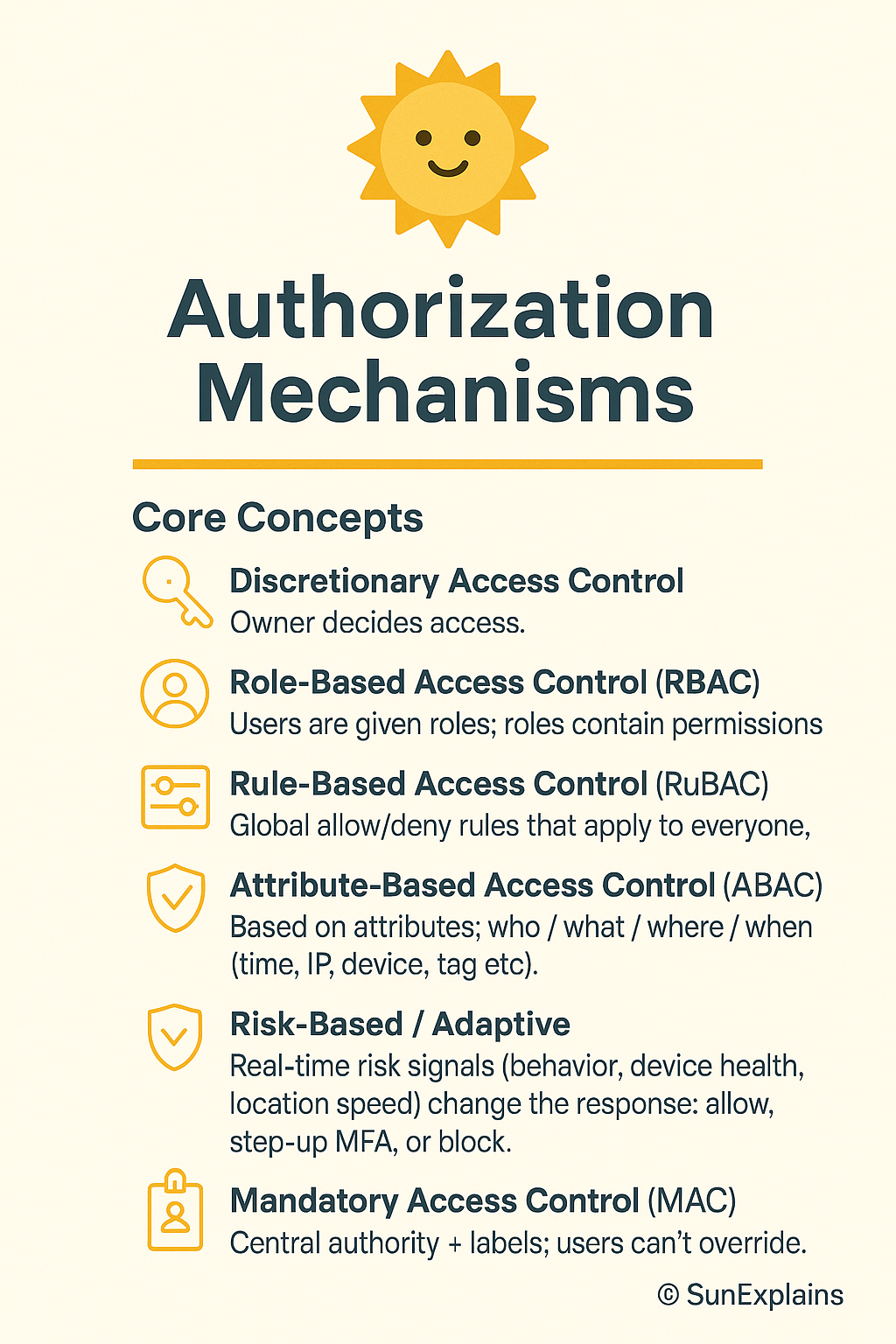
DAC — Discretionary Access Control (owner decides; ACL-based)
- Definition: The owner of a file or resource sets permissions using an ACL (Access Control List).
- Everyday: You decide who gets a copy of your house key.
- Technical: NTFS file owner adds users/groups as ACEs (Access Control Entries).
Non-DAC — Centrally managed
RBAC — Role-Based Access Control
- Definition: Users are given roles; roles contain permissions.
- Everyday: “All cashiers can open the cash drawer.”
- Technical: Database “read-only” vs “admin”; Kubernetes ClusterRoles.
Rule-Based — Global static rules
- Definition: Global allow/deny rules that apply to everyone.
- Everyday: Office closes at 9 p.m. After that, nobody enters.
- Technical: Block
DELETEin production outside maintenance windows.
ABAC — Attribute-Based Access Control (dynamic)
- Definition: Policies look at attributes of the user, resource, action, and environment (time, IP, device, tag).
- Everyday: “Cashier on shift, inside the store, with 2FA can process returns under ₹10,000.”
- Technical: AWS IAM policy with tags and
aws:RequestTime/aws:SourceIpconditions.
Risk-Based / Adaptive (ML-assisted)
- Definition: Real-time risk signals (behaviour, device health, location speed) change the response: allow, step-up MFA, or block.
- Everyday: Your bank asks for WebAuthn when you log in at 3 a.m. from a new city.
- Technical: UEBA spots “impossible travel”; IdP forces step-up; session TTL (time-to-live) is shortened.
MAC — Mandatory Access Control (labels enforce policy)
- Definition: A central authority enforces data labels (Public / Confidential / Secret). Owners cannot bypass them.
- Everyday: On a military site, clearance level decides access, not your manager.
- Technical: SELinux/AppArmor label rules.
Real-World Case Study
Failure — Roles that grew barnacles
- Situation: Startup used RBAC. Exceptions piled up. Temporary admin never expired.
- Impact: An old role with wildcard storage access was abused; logs were exfiltrated; audit found “toxic” access everywhere.
- Lesson: RBAC without expiry and review turns into “everyone can do everything.” Add lifecycle.
Success — From rules to risk
- Situation: A fintech added ABAC tags (
DataClass,Env,Team) and plugged in a risk engine (device health + location). - Impact: Standing admin dropped 70%. High-risk sessions required WebAuthn and just-in-time (JIT) elevation tied to tickets.
- Lesson: ABAC gives context; risk-based makes it adaptive. Speed stays; blast radius shrinks.
Action Framework — Prevent → Detect → Respond
Prevent
- Match model to sensitivity:
- Low: RBAC + simple rules
- Medium: RBAC + ABAC
- High/regulatory: MAC zones + ABAC inside
- Deny by default. Allow by policy.
- Replace standing admin with JIT elevation (short TTL, ticket-bound).
- Use phishing-resistant MFA (FIDO2/WebAuthn) for sensitive actions.
- Use policies as code: version control, peer review, tests.
Detect
- UEBA baselines for off-hours access and unusual paths.
- Drift alerts: wildcards, owner-granted ACLs in “centralised” areas, rules that quietly expand.
- Access reviews with context (last used, data touched, owner).
- Honey-permissions: a fake “super-role” that alerts if used.
Respond
- Automate: end sessions, revoke tokens, rotate keys, quarantine devices.
- Adapt mid-session: step-up MFA or lower privileges for risky activity.
- After incidents: shorten TTLs, tighten conditions, restrict networks/devices.
- Track MTTR-R (mean time to revoke), standing-privilege minutes, and % of risky sessions challenged.
Key Differences to Keep in Mind
- DAC vs Non-DAC:
Personal choice vs central rules.
Example: Engineer shares via ACL (DAC) vs platform team enforcing company-wide PII controls (Non-DAC). - RBAC vs Rule-Based:
Roles grant abilities vs global guardrails.
Example: “DB-Reader” exists, but a global rule blocksDELETEin prod. - Rule-Based vs ABAC:
Static rules vs context-aware checks.
Example: “Office hours only” vs “Office hours + managed device + inside HQ.” - ABAC vs Risk-Based:
Deterministic policy vs policy plus real-time risk score.
Example: ABAC would allow; risk engine forces WebAuthn because of geo-velocity. - ABAC vs MAC:
Flexible context vs label-enforced no-exceptions.
Example: Secret-labelled data stays blocked under MAC, even if ABAC says yes.
Mini Example — NTFS vs AWS IAM
NTFS (DAC-style)
- Definition: File owners set ACLs and delegate access.
- Everyday: You decide who can open a folder on your laptop.
- Technical: Owner adds users/groups to ACEs; auditing is per object and scattered.
AWS IAM (ABAC/RBAC hybrid)
- Definition: Central identity + resource policies with conditions.
- Everyday: Employees can enter the office, but only those on shift, inside the building, with badge + 2FA can open the safe.
- Technical: Policies using tags (
Project=Card), context keys (aws:MultiFactorAuthPresent,aws:SourceIp), and roles for coarse entitlements.
Visual Placeholder — Access Control Model Hierarchy
ACCESS CONTROL MODEL HIERARCHY

 DAC ──► Owner decides (ACL-based)
  │
  ├──► Non-DAC → centrally managed
       ├──► RBAC → Role-based
       ├──► Rule-Based → Global static rules
       │     └──► ABAC → Attribute-driven dynamic rules
       │           └──► Risk-Based → Adaptive, ML-driven
       └──► MAC → Label/classification enforced by system
Summary Table
| Concept | Definition | Everyday Example | Technical Example |
|---|---|---|---|
| DAC | Owner sets per-object access (ACL) | You give someone your house key | NTFS owner adds ACEs; UNIX rwx |
| RBAC | Roles bundle permissions | “Cashier can open the drawer” | DB read-only/admin; K8s ClusterRole |
| Rule-Based | Global static rules | Office closes at 9 p.m. | IP allowlist; deny DELETE in prod |
| ABAC | Attributes decide access | On-shift + in-store + 2FA | AWS IAM conditions on tags/time/IP |
| Risk-Based | Real-time risk adapts | Extra checks on odd login | UEBA + step-up MFA/JIT elevation |
| MAC | Labels/clearance enforced | Clearance decides access | SELinux/AppArmor label policies |
What’s Next
Next: From RBAC to ABAC without tears — a tag schema you can copy, a test harness, and safe “break-glass.”
🌞 The Last Sun Rays…
Access isn’t just ‘allowed’ or ‘denied’—it’s a decision shared between owners (DAC), roles (RBAC), context (ABAC), risk engines, and data labels (MAC). Secure IAM is choosing the right decider for the right data.
Who decides your access?
- You (DAC) for small, local sharing.
- Your organization (RBAC / Rules / ABAC) for scale and consistency.
- The system (Risk-Based / MAC) when context or classification must win, even over humans.
✅ CTA: Audit your IAM today — find where your control model leaks.
💭 Reflection: Which one new signal (device health, location trust, behaviour anomaly) would cut the most risk in your setup?
Authorization mechanisms build on authentication — see Authentication Factors Explained: IAM Series (Part 3). The identity provisioning that grants the access rights that authorization enforces is in Identity and Access Provisioning Lifecycle Explained (Part 5). For IAM on the Internet, including OAuth authorization, see Authentication vs Authorization on the Internet: IAM Explained (Part 6). The CISSP Domain 5 complete guide that covers all IAM authorization models is at CISSP Domain 5: Identity and Access Management Complete Guide.
Related reading: Explore more in-depth coverage across the CISSP Study Guide and other resources listed below.
- CISSP Study Guide — the complete roadmap for all 8 CISSP domains
- CISSP Elite Framework — exam-focused revision content
- Controlling and Monitoring Access — CISSP-focused coverage of access control mechanisms

By profession, a CloudSecurity Consultant; by passion, a storyteller. Through SunExplains, I explain security in simple, relatable terms — connecting technology, trust, and everyday life.
Leave a Reply