Like Building a Fire Station Without a City Map, a Kitchen Without Labels, and a Dashboard With No Gauges
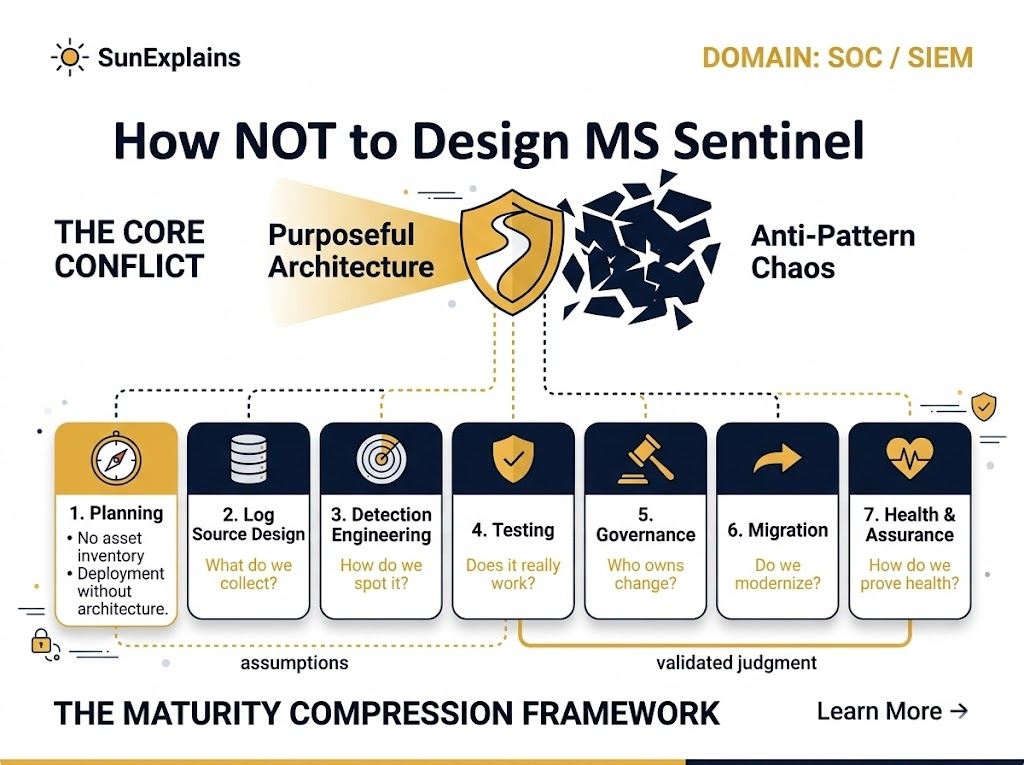
Designing Sentinel the wrong way is basically:
- A fire station without addresses (no asset inventory, no ownership).
- A kitchen with unlabeled jars (no standard parsing, field mismatch, custom logs chaos).
- A cockpit with pretty screens but no instruments (no health metrics, no latency checks, “heartbeat” lies).
This “How NOT to…” series is a reverse blueprint: the anti-patterns that quietly turn Sentinel into an expensive alert-generator that nobody trusts.
2) Why It’s Needed (Context)
Microsoft Sentinel rarely “fails” because KQL (Kusto Query Language) is hard or detections are missing.
It fails because teams skip the boring, foundational work:
- You ingest everything without knowing why → costs explode.
- You enable use-cases without confirming logs exist → blind detections.
- You run SOC operations without governance → chaos, alert noise, and broken workflows.
- You migrate like it’s a tool swap → you carry forward legacy pain.
- You measure “health” with ingestion volume only → you miss latency, drift, and silent failures.
Sentinel is a security operations platform, not a log dumpster or a rule-count trophy cabinet.
3) Core Concepts Explained Simply
Concept A: Asset Inventory
- Technical Definition: A continuously updated list of systems, identities, apps, and data sources you monitor (with criticality and metadata).
- Everyday Example: A city can’t plan emergency response if it doesn’t know what buildings exist.
- Technical Example: You can’t validate “critical devices are reporting” if you don’t have a baseline list of critical devices + expected log sources per device.
Concept B: Ownership Model + RACI
- Technical Definition: Clear accountability for data sources, detections, incident workflows, and platform changes (RACI = Responsible, Accountable, Consulted, Informed).
- Everyday Example: If a shared kitchen has no owner for cleaning and restocking, it becomes unusable.
- Technical Example: Connector breaks (token expiry) → nobody renews credentials → logs stop → detections silently fail.
Concept C: Purpose-Driven Data Collection
- Technical Definition: Collect logs based on threat coverage + business risk + detection goals, not “collect everything.”
- Everyday Example: Don’t store every grocery receipt for life—store the ones you need for taxes or warranty.
- Technical Example: Ingesting verbose debug logs into Analytics when they should be Basic Logs / archive / not collected at all.
Concept D: Log Source Strategy (Connectors, DCR, Retention)
- Technical Definition: A plan for how data enters Sentinel (native connectors vs custom), how it’s normalized, and how long it’s kept (retention + archival).
- Everyday Example: Mail sorting: letters go to the right address, duplicates are rejected, important documents are filed properly.
- Technical Example: Duplicate telemetry from multiple pipelines (e.g., same firewall logs via agent + syslog forwarder) → double ingestion cost + duplicate alerts.
Concept E: Detection Engineering (Use-cases + KQL Hygiene)
- Technical Definition: Detections mapped to attacker behavior, validated against available logs, tuned for signal, and grouped into meaningful incidents.
- Everyday Example: A smoke alarm that triggers on toast every morning gets ignored—even when there’s a real fire.
- Technical Example: “Everything High severity” + no incident grouping + alerts with zero context → analyst fatigue and missed real attacks.
Concept F: Sentinel Health Monitoring
- Technical Definition: Measuring whether Sentinel is receiving the right data, on time, in the right shape—and whether detections are running as expected.
- Everyday Example: A fitness tracker that only counts steps, not heart rate, sleep, or oxygen—looks “fine” until you collapse.
- Technical Example: “Heartbeat present” does not guarantee critical logs are landing, parsed, and usable. Latency (P95 delays) can ruin response.
4) Real-World Case Study
Failure Case: “We enabled 200 rules on Day 1”
Situation: A team migrated to Sentinel and enabled lots of analytic rules (quantity over quality). They also did “collect everything ingestion.”
Impact:
- Costs spiked immediately.
- Alerts fired constantly, many with zero context (missing logs / field mismatch).
- Analysts started ignoring Sentinel (“it’s noisy and useless”).
- A real credential theft event blended into the noise.
Lesson: Rule count is not security. Coverage + context + tuning is security.
Success Case: “Risk-first ingestion and coverage mapping”
Situation: Another team built:
- asset inventory + ownership model,
- log-source → use-case mapping,
- MITRE ATT&CK mapping,
- validation tests (log format + use-case trigger + false positive checks),
- health metrics (latency, drift, connector auth expiry).
Impact:
- Lower ingestion, lower cost.
- Higher signal alerts, faster triage.
- Clear ownership for broken connectors and rule changes.
- Executives got meaningful metrics (MTTD/MTTR and alert noise).
Lesson: Sentinel becomes powerful when it’s run like a product, not installed like a tool.
5) Action Framework — Prevent → Detect → Respond
Prevent (stop the mess before it happens)
- Build asset inventory with criticality tiers (Tier 0/1/2).
- Define ownership + RACI (data owners, detection owners, platform owners).
- Create purpose-driven ingestion policy:
- “If we collect it, what decision does it enable?”
- Create retention + archival strategy (hot vs archive; compliance vs investigation needs).
- Prefer native connectors + normalization over custom logs (unless truly needed).
- Implement RBAC (Role-Based Access Control) standards early (least privilege, separation of duties).
Detect (prove it works, continuously)
- Log validation:
- Are logs landing?
- Are fields parsed correctly?
- Are timestamps sane?
- Use-case validation:
- Does the detection trigger when expected?
- Does it include context (entities, enrichment)?
- Coverage mapping:
- log-source → use-case coverage
- MITRE ATT&CK mapping
- attacker path mapping (how an attacker actually moves in your environment)
- KQL performance testing (avoid slow, expensive queries).
Respond (operate like a mature SOC)
- Incident grouping standards (reduce alert spam).
- Triage playbooks + automation only where it’s safe.
- Change control + documentation as non-negotiable.
- Metrics:
- MTTD (Mean Time To Detect)
- MTTR (Mean Time To Respond)
- alert volume + false positive rate + “noisy top rules”
- Health monitoring:
- ingestion latency (P95)
- connector auth expiry
- DCR drift (Data Collection Rule drift)
- disabled/modified analytic rules
- “critical devices reporting” checks
Quick visual (what good looks like):
[Business Risks] → [Assets & Owners] → [Log Sources] → [Use-Cases] → [Detections] → [Incidents] → [Metrics]
        |                |                |              |              |             |             |
     (map)            (RACI)          (DCR/Conn)      (coverage)     (KQL)        (grouping)   (MTTD/MTTR)
6) Key Differences to Keep in Mind
- “Collect everything” vs “Collect with purpose”
- Scenario: You ingest all verbose logs → bills spike; you still can’t answer “Is Tier-0 authentication monitored?”
- “Heartbeat exists” vs “Critical logs are usable”
- Scenario: Heartbeat shows alive, but ingestion latency (P95) is 2 hours → detections fire too late to matter.
- “Rule count” vs “Coverage and quality”
- Scenario: 300 rules enabled, but no mapping to MITRE ATT&CK or attacker paths → huge gaps + tons of noise.
- “Lift-and-shift migration” vs “Modernization migration”
- Scenario: You migrate every legacy rule → you import legacy SIEM problems into a new platform.
7) Summary Table
| Concept | Definition | Everyday Example | Technical Example |
|---|---|---|---|
| Asset Inventory | List of monitored assets with criticality + metadata | City map of buildings | Baseline “critical devices reporting” checks |
| Ownership Model / RACI | Clear responsibility for platform, data, detections | Shared kitchen ownership | Connector auth expiry gets fixed fast |
| Purpose-Driven Ingestion | Collect logs to support decisions/detections | Keep receipts you actually need | Avoid “collect everything” ingestion cost bomb |
| Log Source Strategy | Plan for connectors, parsing, retention, archival | Mail sorting + filing | Native connectors, avoid duplicate pipelines |
| Detection Engineering | High-signal detections with context, mapped coverage | Smoke alarm that isn’t toast-sensitive | KQL hygiene, incident grouping, MITRE mapping |
| Testing & Validation | Prove logs and detections work | Test fire drills | Replay attacks, log validation, latency tests |
| Governance | Change control, docs, process, metrics | Operating a factory safely | RBAC standards, rule lifecycle, SOC runbooks |
| Health Monitoring | Monitor latency, drift, disabled rules | Cockpit instruments | P95 latency, DCR drift, rule modifications |
8) 🌞 The Last Sun Rays…
If Sentinel feels “bad,” it’s usually not because Microsoft shipped weak detections.
It’s because teams:
- built no map (no inventory),
- assigned no drivers (no owners),
- collected random ingredients (no purpose),
- measured the wrong things (ingestion volume ≠ health),
- and called it “done” without testing.
If you had to pick one thing to fix first:
Would you rather build (1) an asset + ownership map, or (2) a log-source → use-case coverage matrix—and why?

By profession, a CloudSecurity Consultant; by passion, a storyteller. Through SunExplains, I explain security in simple, relatable terms — connecting technology, trust, and everyday life.