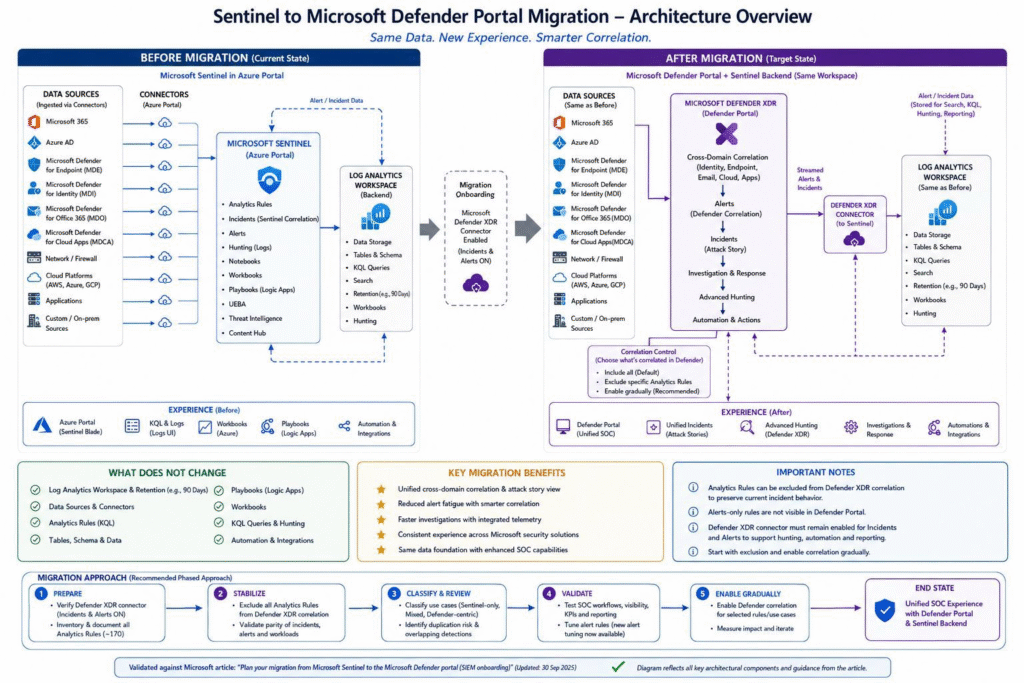
Microsoft Sentinel to Defender Portal Migration — Complete LLD and Execution Plan

What this achieves: A unified SOC platform with a single incident queue, automatic multi-stage attack correlation, cross-platform Advanced Hunting, unified entity pages, and no additional cost.

Before You Start — Key Decisions to Lock In

Get sign-off on all of the following before touching anything technical:

Decision ItemOptionsRecommendedSign-Off Required From
Proceed with migrationYes / No / PhasedYes — full migrationExecutive Sponsor
Migration windowBusiness hours / After-hours / Maintenance windowAfter-hours maintenance windowChange Advisory Board
Data privacy policy changeAccept Defender XDR policies / DeferAccept — documented risk acceptanceDPO / Legal / CISO
CMK encryption scope reductionAccept / Defer migrationDocument as accepted riskCISO / Data Owner
Primary workspace designationOne per tenantDesignate and documentSecurity Architect
Workspace Manager replacementCI/CD Pipelines / Multitenant PortalCI/CD (GitHub/Azure DevOps)Security Architect
API migration strategyMigrate all / Migrate incrementallyIncremental by integration prioritySecurity Architect + Dev Lead
IdentityInfo table-level RBAC removalAccept loss / Design compensating controlDesign compensating control firstSecurity Architect + IAM Lead

⚠️ CMK Notice: CMK-encrypted alerts and incidents will permanently lose CMK encryption after onboarding. Obtain written acceptance from your CISO or Data Owner before proceeding.

Phase Overview

#PhasePrimary AudienceEstimated Duration
1Read Official GuidanceSecurity Architects1–2 Days
2Pre-RequisitesSecurity Architects / Engineers3–5 Days
3Plan Component MigrationSecurity Architects1–2 Weeks
4DesignSecurity Architects / Engineers1–2 Weeks
5ImplementationSecurity Engineers3–7 Days
6TestingSecurity Engineers / SOC Analysts3–5 Days
7ValidationAll Roles2–3 Days
8Sign-Off & CompletionAll RolesOngoing

Total estimated timeline: 4–6 weeks

Phase 1 — Read the Official Docs

Read and understand all five articles before planning anything:

ArticlePurposeKey Takeaway
Plan for unified security operations in the Defender portalArchitecture overview and role assignmentsMicrosoft Sentinel Contributor role auto-assigned to MTP and WDATP apps upon onboarding
Deploy for unified security operationsStep-by-step reference for new and existing customersUse as deployment reference even for existing Sentinel customers
Connect Sentinel to the Defender portalOnboarding prerequisites and procedureNon-E5 customers need an extra manual step to trigger the connection
Data security and retention — Defender XDRDefender XDR data governance policiesThese policies replace Sentinel policies once the Defender portal is used
Alert schema differences: Standalone vs XDR connectorSchema changes when switching connectorsCritical for updating KQL queries, analytics rules, and workbooks

Phase 2 — Pre-Requisites (3–5 Days)

Identity & Permissions

PrerequisiteWhat to CheckHow to VerifyWho
Subscription Owner or User Access AdministratorOnboarding user must hold one of these rolesAzure portal > Subscriptions > IAM > Check role assignmentsSecurity Architect
Microsoft Sentinel workspace is activeWorkspace must be in a healthy, active stateAzure portal > Microsoft Sentinel > Check workspace statusSecurity Engineer
All Sentinel users have Azure AD accountsUsers needing Defender portal access must have valid Azure AD accountsAzure AD > Users > Verify accounts for SOC teamIAM Lead
Microsoft Threat Protection app exists in tenantAuto-assigned Sentinel Contributor role on onboardingAzure AD > Enterprise Applications > Search Microsoft Threat ProtectionSecurity Engineer
WindowsDefenderATP app exists in tenantAuto-assigned Sentinel Contributor role on onboardingAzure AD > Enterprise Applications > Search WindowsDefenderATPSecurity Engineer

Configuration Backup (Take Before Any Onboarding Step)

⚠️ This is your only reliable rollback point. Do not skip.

ComponentExport MethodStorage Location
Analytics RulesSentinel API: GET /analyticsRules or export via Azure portalGit repository
Automation RulesSentinel API: GET /automationRulesGit repository
Playbooks (Logic Apps)Azure portal > Logic Apps > Export (ARM template)Git repository
WorkbooksAzure portal > Sentinel > Workbooks > Export each custom workbookGit repository
WatchlistsAzure portal > Sentinel > Watchlist > Export each listGit repository
Threat Intelligence IndicatorsSentinel API: GET /threatIntelligence/indicatorsGit repository
Hunting QueriesAzure portal > Sentinel > Hunting > Export saved queriesGit repository
Custom KQL FunctionsAzure portal > Logs > Functions — document each functionGit repository

Phase 3 — Plan Your Component Migration (1–2 Weeks)

Data Connectors

Connector CategoryMigration BehaviourAction Required
Microsoft Defender XDR ConnectorCRITICAL — must be active with incidents and alerts turned onVerify connector state; schedule enablement if not active
Defender for Cloud (Tenant-based)Risk of duplicate incidents if not handledPlan deduplication action — document in runbook
Defender for Cloud (Subscription/Legacy)Must opt out of incident/alert sync to DefenderSchedule opt-out step in implementation phase
Defender for Cloud Apps / Endpoint / Identity / Office 365Hidden in Defender portal Data Connectors page post-onboardingInform team; confirm they remain listed in Azure portal
Third-party / Custom ConnectorsContinue operating without interruptionNo migration action needed; verify after onboarding

Analytics Rules

Rule TypeMigration BehaviourPlan Action
Scheduled Analytics RulesFully supported in Defender portalInventory all rules; flag alert-only rules for review
Fusion RuleDISABLED on onboarding — replaced by Defender XDR engineAccept; document replacement; verify correlation post-cutover
Microsoft Incident Creation RulesDEACTIVATED on onboarding to prevent duplicatesAccept; document; do not re-enable
Alert-Only Rules (no incident creation)Alerts NOT visible in Defender portal incident queueDecide per rule: enable incident creation or leave as-is
NRT (Near Real-Time) RulesSupported in Defender portalNo action needed
Custom Detection Rules (Defender XDR)Can now query both Defender XDR and Sentinel tablesIdentify scheduled rules that could migrate to custom detections

Automation Rules — Items to Audit

Item to CheckWhat to Look ForAction Required
Incident Provider conditionsRules filtering on “Microsoft Sentinel” or “Microsoft 365 Defender”Must be updated — all incidents become provider “Microsoft XDR”
Description field conditionsField removed from SecurityIncident table post-onboardingReplace with Incident title, Analytic rule name, Tags, or Severity
Incident title conditionsMay break if rule relied on auto-generated titlesReplace with analytic rule name + tags
Updated By conditions“Updated by: Microsoft 365 Defender” no longer appliesReplace with “Updated by: Other”
Multi-workspace rulesRules tied to secondary workspacesMust transfer to the primary workspace

Playbooks — Capability Changes

Playbook ActionSupported in Defender PortalPlan Decision
Run playbook on incident (triggered)✅ YESNo change needed
Run playbook manually on alert❌ NODocument: must use Azure portal
Run playbook manually on entity❌ NODocument: must use Azure portal
Add alerts to / remove alerts from incidents❌ NORemove these steps from any playbook; update runbooks
Access incident Description field❌ NO (field removed)Update Logic App steps that reference this field
Trigger latencyUp to 5 min delayUpdate SLA documentation; add retry logic if needed

Risk Register

RiskProbabilityImpactMitigation
Duplicate incidents from Defender for Cloud connectorHigh if not handledHighPlan opt-out / deduplication action before onboarding
Analytics rules querying deprecated schema fields breakMediumHighComplete schema difference review in Phase 4
Automation rules firing on wrong incident scopeHigh if not updatedHighUpdate all incident provider conditions before go-live
Playbooks referencing removed Description field failMediumMediumAudit all playbooks; update Logic App steps
IdentityInfo table-level RBAC access control gapLowHighDesign and implement compensating control in Phase 4
Analyst confusion during transition periodHighMediumMandatory training; updated runbooks
Data residency non-compliance in Defender portalLowCriticalDPO sign-off in Phase 2; verify regions before onboarding

Phase 4 — Design (1–2 Weeks)

Schema Differences — KQL & API Updates Required

Schema ElementOld Schema (Standalone)New Schema (XDR Connector)Design Action
Alert product namesalertProductNames (direct field)Requires ?$expand=alerts on GET requestUpdate all API calls; update KQL referencing this field
Provider nameAzure SentinelMicrosoft XDRUpdate any filters referencing Azure Sentinel
Service sourceNot presentserviceSource field availableOptional: enrich analytics rules with new field
Detection sourceNot presentdetectionSource field availableOptional: enrich analytics rules with new field
IdentityInfo (Advanced Hunting)Sentinel Log Analytics fieldsUnified Defender XDR + Sentinel fields — some renamedAudit all IdentityInfo queries for renamed/removed fields

Automation Rules — Redesign Decisions

ElementOld ApproachNew Approach
Incident scopeFilter by Incident Provider = Microsoft SentinelUse Analytic rule name as scope limiter
Description field conditionFilter on Description field contentReplace with Incident title, Analytic rule name, Tags, or Severity
Title conditionsMatch on incident titleReplace with analytic rule name + tags
Updated By condition“Updated by: Microsoft 365 Defender”Replace with “Updated by: Other”

Playbook Redesign

Affected Playbook ActionDesign Solution
Steps using incident Description fieldAdd a Compose step: concat(incident.title + | Severity: + incident.severity + | Entities: + entities list)
Steps adding/removing alerts from incidentsRemove these steps entirely
Manual alert / entity playbook runsKeep available in Azure portal; document in SOC runbooks
Latency-sensitive playbooks (under 5-min SLA)Design retry logic in Logic App; update SLA documentation
ServiceNow incident sync (description field)Build description string from title + severity + alert product names via Logic App Compose step

API Integration Migration Priority

Integration TypeCurrent APITarget APIPriority
Incident CRUD operationsSecurityInsights APIGraph API /security/incidentsHigh
Alert operationsSecurityInsights APIGraph API /security/alerts_v2High
ServiceNow incident URL fieldincidentUrl (Sentinel portal)providerIncidentUrl for Defender portal deep linkHigh
Advanced Hunting queriesSecurityInsights APIGraph API /security/runHuntingQueryMedium
Analytics rule managementSecurityInsights APIKeep SecurityInsights API — fully supportedLow / No change

Phase 5 — Implementation (3–7 Days)

⚠️ Schedule onboarding during an after-hours, low-activity maintenance window. Have a secondary analyst monitoring the Azure portal for 30 minutes post-onboarding. Steps must be completed in order — Steps 1 and 2 must happen before workspace onboarding.

StepActionWhere
1Configure Defender for Cloud connector deduplicationAzure portal > Sentinel > Data Connectors > Tenant-based Defender for Cloud
2Opt legacy Defender for Cloud connector out of incident/alert syncAzure portal > Sentinel > Data Connectors > Legacy connector
3Enable Microsoft Defender XDR connector (incidents + alerts + all Defender product sources)Azure portal > Sentinel > Data Connectors > Microsoft Defender XDR
4Confirm connector shows Connected; test KQL against SecurityAlert tableAzure portal > Sentinel > Logs
5Update all playbooks — replace Description field references with Compose stepAzure portal > Logic Apps
6Confirm maintenance window active; secondary analyst monitoringAzure portal incident queue
7Execute workspace onboarding (non-E5: perform additional manual connection step)Defender portal
8Wait 5 minutes — do not make changes during propagation
9Confirm workspace shows as connected in Defender portalDefender portal
10Verify Sentinel incidents appear in Defender portal incident queueDefender portal > Incidents

Playbook Description Field Compose Step:

concat(triggerBody()?['object']?['properties']?['title'], ' | Severity: ', triggerBody()?['object']?['properties']?['severity'])

Phase 6 — Testing (3–5 Days)

Data Connector Tests

Test IDWhat to TestExpected Result
DC-01Defender XDR connector active with incidents and alertsStatus: Connected; incidents and alerts flowing
DC-02No duplicate incidents from Defender for CloudZero duplicate incidents in both portals
DC-03Third-party connectors continue flowingData present and fresh within expected ingestion latency
DC-04Hidden connectors still listed in Azure portalStill listed and active in Azure portal
DC-05Alert schema — alertProductNames accessiblePopulated correctly via Graph API

Analytics Rules Tests

Test IDWhat to TestExpected Result
AR-01Scheduled rules fire and create incidentsIncident appears in Defender portal incident queue
AR-02Fusion rule is disabledFusion rule shows as Disabled
AR-03Microsoft Incident Creation rules deactivatedAll show as Inactive
AR-04Alert-only rules visibility per designAlert NOT in Defender portal queue; accessible in Advanced Hunting
AR-05Updated KQL schema queries return expected resultsResults match pre-migration baseline
AR-06Alert tuning available for Sentinel alertsTune alert option available and functional

Automation Rules Tests

Test IDWhat to TestExpected Result
AUT-01Automation rule fires on new incidentRule executes within 10 minutes of incident creation
AUT-02Analytic rule name condition scopes correctlyRule fires only for the specified analytics rule incidents
AUT-03No automation rule fires on Description field conditionRule does not fire; no errors
AUT-04Incident title change does not break automationAutomation fires correctly using analytic rule name condition
AUT-05Updated by Other condition fires correctlyRule fires correctly when incident updated by Defender XDR processes
AUT-06Multi-workspace automation rules fire in correct workspaceAutomation rules execute in the workspace they are assigned to

Playbook Tests

Test IDWhat to TestExpected Result
PB-01Triggered playbook runs on incident from Defender portalPlaybook executes successfully within 5–10 minutes
PB-02Composited description field populates correctly in ITSMDescription field populated with title + severity + entities
PB-03Playbook does not fail on removed add/remove alert stepsNo failed runs; Logic App execution history shows Success
PB-04Manual playbook run confirmed in Azure portalExecutes successfully; NOT available from Defender portal
PB-05Playbook triggering latency within SLAAll executions within updated SLA window
PB-06Logic App version history available for rollbackPrevious versions visible and restorable

Workbook Tests

Test IDWhat to TestExpected Result
WB-01All custom workbooks load without errors in Defender portalAll workbooks load; no missing data errors
WB-02IdentityInfo workbooks updated for new field namesData renders correctly with no “column not found” errors
WB-03Workbooks querying SecurityAlert table still workData loads correctly despite table not appearing in schema browser
WB-04Workbook data freshnessData within expected ingestion latency

Advanced Hunting & UEBA Tests

Test IDWhat to TestExpected Result
AH-01All existing Sentinel KQL tables queryable in Advanced HuntingAll queries return data; no “table not found” errors
AH-02Bookmarks migrated to Threat Management > HuntingAll pre-migration bookmarks visible and accessible
AH-03IdentityInfo table unified field names in Advanced HuntingFields return data; updated queries with new field names work
AH-04Cross-platform query (Sentinel + Defender XDR)Query returns results from both data sources in one response
AH-05SecurityAlert table queryable despite not in schema browserQuery executes and returns results
AH-06UEBA entity pages load with unified contextEntity page shows combined Sentinel + Defender XDR context

Incident Queue & Correlation Tests

Test IDWhat to TestExpected Result
IQ-01Unified incident queue shows Sentinel and Defender XDR incidentsIncidents from both sources appear in the same queue
IQ-02Incident provider is Microsoft XDR for all incidentsAll show Microsoft XDR as provider
IQ-03Multi-stage correlated incident testSingle unified incident with alerts from multiple domains correlated
IQ-04No Sentinel alerts from alert-only rules visible in queueNot present in queue; access via Advanced Hunting only
IQ-05Incident comment add/edit behaviourComment added successfully; editing not supported in Defender portal
IQ-06Closed incident behaviour — new alerts create new incidentNew incident created; closed incident remains closed

Phase 7 — Validation (2–3 Days)

SOC Analyst Walkthrough

TierWorkflow Steps
Tier 1 — TriageLog into Defender portal → Navigate incident queue → Filter by severity → Open incident → Review correlated alerts → Classify and assign
Tier 2 — InvestigationOpen a medium/high severity incident → Navigate entity pages → Review UEBA context → Run Advanced Hunting query from incident → Add investigation note
Tier 3 — ResponseTrigger a response playbook → Confirm playbook executes → Verify ITSM ticket created with correct data

Known Limitations — Accept and Document

Known LimitationWorkaround
Similar Incidents feature not available in Defender portalUse Advanced Hunting to find similar incidents by entity/tactic
Incident Tasks not availableUse external ITSM task management; document task steps in incident comments
Manual playbook run on alert/entity not in Defender portalRun from Azure portal; document in SOC runbooks
Add entity to Threat Intelligence — Azure portal onlyNavigate to Azure portal for this specific action
Edit incident comments not supportedAdd new comments; archive original comment content externally
Programmatic/manually created incidents not synced to Defender portalAccess via Azure portal or API; accepted as deliberate design
Table-level RBAC on IdentityInfo removedCompensating control implemented per design in Phase 4

Phase 8 — Migration Complete Checklist

The migration is officially complete when all of the following are signed off:

Completion GateSign-Off AuthorityStatus
All Phase 6 testing tests marked PassSecurity Engineering Lead
All Phase 7 validation items confirmedSOC Lead
All success criteria marked PassSecurity Architect
SOC analyst training completedSOC Lead
ITSM/ServiceNow integration confirmedSecurity Engineer / ITSM Admin
Risk register reviewed; residual risks acceptedCISO
Post-migration review meeting scheduled within 30 daysProject Lead
Azure portal decommission plan agreed (if applicable)Security Architect + CISO

Source: learn.microsoft.com/en-us/azure/sentinel/move-to-defender | Document by Surya PS, CISSP | sunexplains.com

Comments

Leave a Reply

Your email address will not be published. Required fields are marked *

Index