Blog

  • CISSP Security Models Explained: Bell-LaPadula, Biba, Clark-Wilson & More

    Imagine three different worlds:

    • A bank vault that protects valuables from unauthorized eyes.
    • A traffic control system that decides where vehicles can and cannot travel.
    • A corporate office where employees can only approve transactions if someone else has reviewed them.

    Although these systems solve different problems, they all rely on one thing—rules.

    Security models work exactly the same way. They define mathematical rules that determine who can access what, when, and under which conditions. They are the invisible rulebooks behind operating systems, databases, military systems, financial applications, and enterprise security architectures.

    For CISSP candidates and cybersecurity professionals, understanding security models isn’t about memorizing names. It’s about recognizing which security objective a model protects and choosing the correct model for the situation.


    Why CISSP Security Models Matter (Context)

    Organizations process enormous amounts of sensitive information every second. Without formal security rules:

    • Confidential data could leak.
    • Critical information could be modified by unauthorized users.
    • Employees could create conflicts of interest.
    • Data might flow into untrusted environments.
    • System processes could interfere with each other.

    Security models solve these problems by providing formal mathematical frameworks that operating systems and applications can implement consistently.

    The CISSP Mindset

    Instead of asking:

    “Which model is this?”

    Ask:

    “What security objective is the organization trying to protect?”

    Once you answer that question, selecting the appropriate model becomes much easier.


    Core Concepts Explained Simply

    1. Bell-LaPadula (BLP) Model – Protecting Confidentiality

    Technical Definition

    Bell-LaPadula is a confidentiality model that prevents unauthorized disclosure of classified information through mandatory access control rules.

    Its primary objective is Confidentiality.

    Everyday Example

    Imagine a government archive.

    A visitor with a public clearance cannot enter the classified records room.

    Likewise, an intelligence officer cannot leave classified documents on a public reception desk.

    The goal is simple:

    Keep secrets from leaking.

    Technical Example

    Suppose an administrator has Top Secret clearance.

    They can:

    • Read Top Secret documents.
    • Read Secret documents.

    But they cannot write classified information into a Public folder because that could leak sensitive information.

    Key Rules

    Simple Security Property

    No Read Up (NRU)

    Users cannot read information above their clearance.

    Star (*) Property

    No Write Down (NWD)

    Users cannot write sensitive information into lower classifications.

    Memory Trick

    🔔 Bell Rings to Keep Secrets


    2. Biba Model – Protecting Integrity

    Technical Definition

    Biba focuses on preventing unauthorized modification of information.

    Its objective is Integrity.

    Everyday Example

    An intern should never edit the company’s audited financial report.

    Even if they can view it, modifying it would compromise trust.

    Technical Example

    A junior database operator cannot update executive payroll records.

    The system protects trusted data from less trusted users.

    Key Rules

    No Read Down

    High-integrity users avoid reading low-integrity data that could contaminate their decisions.

    No Write Up

    Lower-integrity users cannot modify higher-integrity information.

    Memory Trick

    🏗 Biba Builds Integrity


    3. Brewer-Nash (Chinese Wall) Model

    Technical Definition

    Brewer-Nash dynamically changes access permissions to prevent conflicts of interest.

    Everyday Example

    Imagine a financial consultant.

    Today they work with Bank A.

    Tomorrow they cannot access confidential information from Bank B if it competes with Bank A.

    The system automatically prevents conflicts.

    Technical Example

    Investment banking firms use this approach to stop analysts from accessing competing client information.

    Memory Trick

    🧱 The Wall Separates Competitors


    4. Clark-Wilson Model

    Technical Definition

    Clark-Wilson protects commercial data integrity through:

    • Well-formed transactions
    • Separation of duties
    • Auditing
    • Certification

    Everyday Example

    A bank transfer requires:

    Employee → Manager Approval → Finance Processing

    Nobody performs every step alone.

    Technical Example

    Payroll modifications require:

    Developer → HR Approval → Finance Verification → Audit Log

    This workflow prevents fraud and accidental mistakes.

    Memory Trick

    🏢 Clark Controls the Corporation


    5. Information Flow Model

    Technical Definition

    Instead of controlling users, the Information Flow Model controls how information moves between security domains.

    Everyday Example

    A hospital keeps patient records inside secure systems.

    Those records should never automatically appear on a public website.

    Technical Example

    Sensitive HR databases cannot transmit employee records to Internet-facing applications without policy enforcement.

    Memory Trick

    🌊 Think About the Flow of Data


    6. Noninterference Model

    Technical Definition

    The Noninterference Model ensures one security domain cannot influence another.

    Everyday Example

    Think of apartments sharing one building.

    Your neighbor cannot change your electricity simply because you share the same structure.

    Isolation is maintained.

    Technical Example

    In virtualization:

    VM A should never affect VM B.

    Hypervisors enforce this isolation.

    Memory Trick

    🚫 No Cross Influence


    7. State Machine Model

    Technical Definition

    The State Machine Model ensures every system transition moves from one secure state to another secure state.

    Everyday Example

    Consider an ATM.

    Regardless of deposits or withdrawals, the account balance must always remain valid.

    Every transaction preserves correctness.

    Technical Example

    Database transactions validate permissions and consistency before committing changes.

    Memory Trick

    🔄 Stay Secure Every Step


    Real-World Case Study

    Failure Story: Insider Data Leakage

    Situation

    A defense contractor allowed administrators to move classified reports into lower-security repositories without enforcing strict confidentiality controls.

    Impact

    • Sensitive information became accessible to unauthorized personnel.
    • Regulatory violations followed.
    • The organization suffered financial and reputational damage.

    Lesson

    A confidentiality-focused model like Bell-LaPadula is designed specifically to prevent this type of information leakage by enforcing No Write Down.


    Success Story: Commercial Banking Controls

    Situation

    A multinational bank redesigned its payment approval workflow.

    Instead of allowing one employee to approve transactions, it introduced:

    • Separation of duties
    • Workflow approvals
    • Independent auditing

    Result

    • Reduced insider fraud risk
    • Improved compliance
    • Stronger audit readiness

    Lesson

    This reflects the principles of the Clark-Wilson Model, where commercial integrity is maintained through controlled transactions rather than simple access permissions.


    Action Framework

                    SECURITY MODEL WORKFLOW
    
              Prevent
                  │
                  ▼
       Choose the correct security model
       Apply least privilege
       Define security classifications
    
                  │
                  ▼
               Detect
       Audit transactions
       Monitor data movement
       Review access violations
    
                  │
                  ▼
               Respond
       Block unauthorized access
       Investigate anomalies
       Update policies and workflows
    

    Prevent

    • Identify the primary security objective (Confidentiality, Integrity, or Information Flow).
    • Apply the appropriate security model.
    • Enforce separation of duties where required.

    Detect

    • Monitor access violations.
    • Audit transaction workflows.
    • Track sensitive data movement across domains.

    Respond

    • Revoke inappropriate permissions.
    • Investigate policy violations.
    • Improve governance based on audit findings.

    Key Differences to Keep in Mind

    Security ModelOne-Line DifferencePractical Scenario
    Bell-LaPadula vs BibaConfidentiality vs IntegrityMilitary secrets vs Financial records
    Biba vs Clark-WilsonPrevents unauthorized modification vs Ensures authorized workflowsDatabase edits vs Payroll approval
    Chinese Wall vs Bell-LaPadulaDynamic conflict prevention vs Fixed classificationConsultant switching clients vs Military clearance
    Information Flow vs Access ControlControls data movement rather than user permissionsHR data leaving secure networks
    Noninterference vs State MachineIsolation between domains vs Maintaining secure statesVirtual machines vs Database transactions

    Summary Table

    ConceptDefinitionEveryday ExampleTechnical Example
    Bell-LaPadulaConfidentiality modelMilitary archiveClassified document protection
    BibaIntegrity modelIntern cannot edit reportsPayroll protection
    Clark-WilsonCommercial integrityDual approval bankingAuthorized transaction workflow
    Chinese WallPrevents conflicts of interestConsultant switching clientsInvestment banking
    Information FlowControls data movementHospital recordsCross-domain data transfer
    NoninterferenceDomain isolationApartment utilitiesVirtual machine isolation
    State MachineMaintains secure statesATM transactionsDatabase consistency

    🌞 The Last Sun Rays…

    Remember the opening analogies?

    • The bank vault reminds us of Bell-LaPadula, protecting confidentiality.
    • The traffic control system reflects the Information Flow Model, ensuring data moves only where it should.
    • The corporate approval process embodies Clark-Wilson, maintaining integrity through trusted workflows.

    The biggest CISSP mistake is treating security models as names to memorize. The better mental model is to start with the security objective:

    • Need to keep secrets? → Bell-LaPadula
    • Need to protect data accuracy? → Biba
    • Need trusted business transactions? → Clark-Wilson
    • Need to avoid conflicts of interest? → Chinese Wall
    • Need to control where data travels? → Information Flow
    • Need isolated execution environments? → Noninterference
    • Need every operation to preserve security? → State Machine

    As a security architect or CISSP professional, the question isn’t “Which model do I remember?” It’s “Which security goal am I protecting?”

    Reflective Challenge: If you were designing a new enterprise system tomorrow, which single security model would be the foundation of your architecture—and why?


    Frequently Asked Questions

    1. What is the purpose of security models in CISSP?

    Security models provide formal rules for enforcing confidentiality, integrity, and secure information flow.

    2. Which security model protects confidentiality?

    Bell-LaPadula focuses on confidentiality using the principles of No Read Up and No Write Down.

    3. How is Biba different from Bell-LaPadula?

    Biba protects integrity, while Bell-LaPadula protects confidentiality.

    4. Where is the Clark-Wilson model commonly used?

    Commercial environments such as banking, payroll, ERP systems, and financial applications.

    5. What is the easiest way to remember CISSP security models?

    Start by identifying the security objective—confidentiality, integrity, conflict prevention, information flow, isolation, or secure state—then map it to the appropriate model.

  • Secure Design Principles: Building Cybersecurity Like a Bank Vault, an Apartment Block, and an Airport Checkpoint

    A bank does not protect its vault with one oversized padlock.

    An apartment building does not give every resident a master key.

    An airport does not wave passengers through security because they were checked during their previous journey.

    These physical systems work because protection is designed into the environment: entrances are controlled, responsibilities are separated, failures are anticipated, and suspicious activity remains visible.

    Secure design principles apply the same thinking to applications, cloud platforms, networks, identities, data, and business processes.

    They help architects answer questions such as:

    • What could go wrong?
    • Who genuinely needs access?
    • What happens when a component fails?
    • Who is accountable for each control?
    • Can one mistake expose the entire system?
    • Are we making the secure action the easiest action?

    The current Certified Information Systems Security Professional (CISSP) exam outline places threat modelling, least privilege, defence in depth, secure defaults, fail securely, Segregation of Duties, simplicity, Zero Trust, privacy by design, shared responsibility, and Secure Access Service Edge within Domain 3.1.

    This article expands those Domain 3.1 concepts into a reusable architecture and exam-thinking framework.


    In This Article

    1. Why Secure Design Principles Are Needed

    Security teams often inherit systems after the important decisions have already been made.

    The application is live.

    The cloud environment is connected.

    The data model is fixed.

    The privileged roles have accumulated permissions.

    The deadline has passed.

    At that point, security becomes a renovation project inside an occupied building. Doors must be replaced without stopping business. Wiring must be rerouted while customers are using the service. Emergency exits must be added after people have already moved in.

    Secure design principles change the order.

    Instead of asking, “Which security product should we add?”, the organisation first asks:

    “How should this system behave so that common mistakes, attacks, and failures do not become major incidents?”

    That shift matters because insecure design is not merely a missing firewall or an unpatched library. It can be a flawed trust assumption, an unsafe workflow, an overpowered service account, an unprotected failure mode, or an architecture that gives one person too much control.

    The Open Worldwide Application Security Project (OWASP) describes threat modelling as a structured and repeatable process for understanding a system, identifying applicable threats, and deciding how those threats should be addressed. OWASP recommends performing it during design and maintaining it as the system evolves.

    Secure design creates value in four ways:

    It prevents expensive rework.
    A missing security requirement is easier to fix on a diagram than after thousands of users depend on the system.

    It limits blast radius.
    When an account, control, or component fails, the damage remains contained.

    It makes accountability visible.
    Teams know who configures, approves, monitors, tests, and responds.

    It supports business resilience.
    The organisation can continue operating even when individual safeguards fail.

    Think of it as architectural gravity: every later security decision is influenced by the assumptions made during design.


    2. Core Secure Design Principles Explained Simply

    Threat Modelling: Inspect the Blueprint Before Construction

    Technical definition

    Threat modelling is a structured process for identifying assets, data flows, trust boundaries, threats, vulnerabilities, attack paths, and appropriate controls while a system is being designed.

    It asks four practical questions:

    1. What are we building?
    2. What could go wrong?
    3. What will we do about it?
    4. Did we do enough?

    These questions closely align with OWASP’s threat-modelling guidance.

    Everyday example

    Before constructing an apartment block, an architect reviews:

    • Public entrances
    • Emergency exits
    • Underground parking access
    • Delivery areas
    • Windows reachable from the street
    • Access to electrical and water systems

    The architect is not predicting one specific burglar. The architect is identifying possible paths through which harm could occur.

    Technical example

    A team designing an authentication service maps:

    User
      |
      v
    Login Page ---> Identity Provider
      |                    |
      v                    v
    Session Token ---> Application ---> Customer Database
    

    The team identifies several attack paths:

    • Credential stuffing against the login page
    • Token theft from an insecure browser session
    • Privilege escalation within the application
    • Direct database access by an overprivileged service account

    Controls can then be added before deployment, such as multifactor authentication, rate limiting, short-lived tokens, role validation, and restricted database permissions.

    CISSP mindset

    When a question asks what the architect should do first to identify potential attacks, begin with threat modelling—not tool selection.


    Least Privilege: Give Each Person the Smallest Necessary Key

    Technical definition

    Least privilege means users, processes, devices, applications, and services receive only the permissions necessary to perform authorised tasks.

    Access should be limited by:

    • Resource
    • Action
    • Time
    • Environment
    • Business purpose

    Everyday example

    An apartment resident receives a key to:

    • Their apartment
    • The main entrance
    • Approved common areas

    They do not receive keys to every apartment, the management office, the electrical room, and the building safe.

    Technical example

    A backup service account may:

    • Read designated production files
    • Write encrypted backups to an approved storage location

    It may not:

    • Create users
    • Change firewall rules
    • Delete security logs
    • Modify application code

    If the account is compromised, the attacker inherits a narrow capability rather than control of the entire environment.

    CISSP mindset

    Least privilege answers:

    “How much access is genuinely required?”

    It is usually the best answer when the question focuses on limiting the impact of a compromised identity.


    Zero Trust: Check Every Entry Request

    Technical definition

    Zero Trust is a security model that does not grant implicit trust based only on network location, device ownership, or previous access.

    Each access request is evaluated using factors such as:

    • Identity
    • Device condition
    • Requested resource
    • Authentication strength
    • Location
    • Behaviour
    • Risk
    • Current policy

    The National Institute of Standards and Technology (NIST) explains that Zero Trust shifts protection away from static network perimeters and towards users, assets, and resources. It assumes that network location alone is not sufficient evidence of trust.

    Everyday example

    An airport does not admit a passenger to a restricted gate because they passed security last month.

    Their identity, ticket, baggage, and current travel authorisation are checked for the present journey.

    Technical example

    An employee accessing a finance application must:

    • Authenticate with phishing-resistant multifactor authentication
    • Use a managed and compliant device
    • Request access from an approved region
    • Hold an appropriate finance role
    • Reauthenticate when risk conditions change

    Being connected to the corporate network is not enough.

    CISSP mindset

    Zero Trust does not mean “trust nobody forever.”

    It means:

    Never treat trust as permanent, automatic, or based solely on location.


    Trust but Verify: Allow the Action, Then Validate It

    Technical definition

    Trust but verify allows an authorised entity to act while monitoring, logging, reviewing, or auditing its behaviour.

    Everyday example

    A building manager may approve maintenance expenses, but invoices and receipts are independently reviewed.

    Technical example

    A privileged administrator can change production configurations, but:

    • Commands are logged
    • Sessions are recorded
    • Changes require tickets
    • Alerts detect unusual actions
    • Reviews confirm the change matched the approved purpose

    CISSP mindset

    Trust but verify is most relevant after access has already been granted.

    Zero Trust decides whether the request should be allowed. Trust but verify checks whether the resulting activity remains legitimate.


    Defence in Depth: Use Locks, Cameras, Guards, and Alarms

    Technical definition

    Defence in depth uses multiple independent and overlapping controls so the failure of one safeguard does not expose the entire system.

    Everyday example

    A bank uses:

    • Entrance controls
    • Security guards
    • Cameras
    • Alarms
    • Locked internal doors
    • A reinforced vault
    • Silent incident notifications

    No single control carries the entire burden.

    Technical example

    A customer application may use:

    Internet
       |
    Web Application Firewall
       |
    Authentication + MFA
       |
    Authorisation Checks
       |
    Application Validation
       |
    Encrypted Database
       |
    Logging + Detection
    

    A stolen password does not automatically expose the database because other controls remain active.

    CISSP mindset

    When a question asks how to remain protected after one control fails, choose layered and complementary safeguards.


    Fail Securely: Keep the Door Locked During Failure

    Technical definition

    Fail securely means a system moves into or remains in a protected state when an error, outage, or unexpected condition occurs.

    This is sometimes described as failing closed, although the appropriate response depends on safety and business requirements.

    Everyday example

    If the electronic controller on a high-security storage room loses communication, the door remains locked rather than opening automatically.

    Technical example

    An application requests an authorisation decision.

    The authorisation service times out.

    The application should not interpret “no answer” as “access approved.” It should deny access, restrict functionality, or use a carefully designed safe fallback.

    Important nuance

    Availability and human safety can change the design.

    For example, a fire exit may need to unlock during an emergency. The correct secure state must therefore be defined through risk analysis rather than assumed blindly.

    CISSP mindset

    When authorisation cannot be verified, the preferred answer is normally to deny access and preserve protection.


    Secure Defaults: Deliver the Building Locked

    Technical definition

    Secure defaults mean systems begin in a protected state. Expanding access or weakening controls requires an intentional and authorised decision.

    Everyday example

    A new safe is delivered locked.

    The customer must deliberately configure who can open it. The safe does not arrive with its door open and a note asking the customer to secure it later.

    Technical example

    A newly deployed cloud service begins with:

    • No public access
    • No administrator permissions for standard users
    • Encryption enabled
    • Logging enabled
    • Unused services disabled
    • Restrictive network rules
    • Mandatory password replacement or unique initial credentials

    CISSP mindset

    Secure by default means the customer should not need expert knowledge to avoid basic exposure.

    The Cybersecurity and Infrastructure Security Agency (CISA) advises manufacturers not to ship products with shared default passwords and recommends secure configurations that avoid exposing administrative interfaces to the internet.


    Segregation of Duties: Separate the Requester, Approver, and Reviewer

    Technical definition

    Segregation of Duties (SoD) divides critical activities among multiple people or roles so one individual cannot independently initiate, approve, execute, and conceal a sensitive action.

    Everyday example

    One employee prepares a high-value payment.

    A second employee approves it.

    A third function reconciles the account.

    Technical example

    For a production change:

    Engineer requests change
              |
              v
    Manager approves change
              |
              v
    Deployment pipeline executes change
              |
              v
    Security or operations reviews evidence
    

    The same administrator should not be able to create an unapproved change, deploy it, erase the logs, and approve the result.

    CISSP mindset

    SoD primarily reduces fraud, conflicts of interest, abuse, and undetected errors.


    Shared Responsibility: Know Whether the Landlord or Tenant Owns the Lock

    Technical definition

    Shared responsibility distributes security duties among multiple parties, with each party accountable for explicitly defined controls.

    Everyday example

    A landlord maintains:

    • The building structure
    • Shared entrances
    • Lifts
    • Fire systems

    The tenant manages:

    • Their apartment key
    • Visitors
    • Personal belongings
    • Whether the apartment door is locked

    Assuming the other party is responsible creates gaps.

    Technical example

    In a cloud service:

    The provider may secure:

    • Physical facilities
    • Hardware
    • Core infrastructure
    • Managed-service platform components

    The customer may remain responsible for:

    • Identity permissions
    • Data classification
    • Application configuration
    • Public exposure
    • Endpoint security
    • Workload-specific logging

    The exact division depends on the service and contract.

    CISSP mindset

    When several parties are involved, the first step is to define and document who owns each security responsibility.


    Keep It Simple and Small: Fewer Doors, Fewer Keys, Fewer Mistakes

    Technical definition

    Keep it simple and small means minimising unnecessary components, features, integrations, permissions, interfaces, and code.

    Everyday example

    A building with three well-monitored entrances is easier to protect than one with 47 doors, several forgotten service tunnels, and five different locking systems.

    Technical example

    A microservice designed only to generate invoices should not also contain:

    • User administration functions
    • Remote shell access
    • Unused database drivers
    • Legacy protocols
    • Experimental management interfaces

    Every unnecessary feature becomes another configuration, dependency, maintenance task, and possible attack path.

    CISSP mindset

    Complexity is not automatically sophistication.

    The best design is usually the simplest one that fully satisfies business and security requirements.


    Privacy by Design: Decide What Information the Reception Desk Really Needs

    Technical definition

    Privacy by design embeds privacy requirements into architecture, workflows, data models, and system behaviour from the beginning.

    It includes decisions about:

    • What personal data is collected
    • Why it is needed
    • How long it is retained
    • Who can access it
    • Where it is stored
    • How it is deleted
    • How individuals exercise privacy rights

    Everyday example

    A visitor form asks for the information required to grant building access.

    It does not request salary, medical history, family details, and personal interests “in case they are useful later.”

    Technical example

    A registration service:

    • Collects only necessary personal information
    • Separates identity data from analytics
    • Encrypts sensitive fields
    • Applies purpose-based access
    • Defines automatic deletion periods
    • Prevents production data from being copied casually into testing environments

    CISSP mindset

    Privacy begins during requirements and design—not after deployment when a compliance review finds excessive collection.


    Secure Access Service Edge: Apply the Same Checkpoint Wherever Users Enter

    Technical definition

    Secure Access Service Edge (SASE) combines network connectivity and security capabilities into an integrated architecture delivered close to distributed users, devices, applications, and resources.

    Common capabilities can include:

    • Identity-aware access
    • Secure web access
    • Cloud access controls
    • Firewall services
    • Data protection
    • Wide-area network connectivity

    Everyday example

    Imagine a property company with buildings in many countries.

    Instead of every building inventing its own visitor process, a unified security service applies consistent entry rules regardless of which entrance is used.

    Technical example

    A remote employee accessing a Software as a Service application is routed through a unified security service that evaluates:

    • User identity
    • Device health
    • Destination
    • Data sensitivity
    • Threat indicators
    • Access policy

    This makes policy enforcement less dependent on a traditional corporate network boundary.

    CISSP mindset

    SASE is an architecture for consistent connectivity and security across distributed environments. It is not merely a remote-access product.


    3. Real-World Case Study

    Failure Case: The Default Password That Became a Critical-Infrastructure Risk

    Situation

    CISA and partner agencies reported malicious activity involving Unitronics programmable logic controllers used in sectors including water and wastewater.

    Their guidance highlighted dangerous design and deployment conditions such as default passwords and internet-exposed administrative interfaces. CISA urged manufacturers to avoid shared default credentials, require safer first-use configuration, support multifactor authentication, and make products secure out of the box.

    Impact

    The lesson is larger than one device type.

    A default credential creates a predictable entry point. An exposed administration interface makes that entry point reachable. Weak segmentation can then allow a local device compromise to affect a broader operational environment.

    Several secure design principles had to work together:

    • Secure defaults: Do not ship with predictable credentials.
    • Least privilege: Limit the device’s authority and communications.
    • Defence in depth: Add segmentation, monitoring, authentication, and restricted management access.
    • Keep it simple and small: Remove unnecessary internet-facing management functions.
    • Shared responsibility: Clarify what the manufacturer, integrator, and operator must each secure.
    • Threat modelling: Identify remote administrative compromise during design.

    Lesson

    The failure was not simply “somebody forgot to change a password.”

    That framing places all responsibility on the customer.

    The architectural question is:

    Why could an unsafe default remain usable, reachable, and powerful enough to create serious risk?

    Secure design removes predictable failure paths instead of assuming every customer will configure every product perfectly.


    Success Case: A Composite Secure Design Review

    Consider a composite example based on common enterprise architecture practices.

    A financial-services company plans a new cloud-based payment platform.

    Before writing production code, the team conducts a threat-modelling workshop involving architects, developers, fraud specialists, privacy representatives, operations staff, and incident responders.

    They discover that the initial design allows one service account to:

    • Read customer records
    • Submit payments
    • Change beneficiary details
    • Access production logs

    The team redesigns the platform.

    • Payment submission and customer-record access use separate service identities.
    • High-risk changes require independent approval.
    • Administrative access uses temporary privileges.
    • The authorisation service denies requests when it cannot make a decision.
    • Personal information is minimised.
    • Public access is disabled by default.
    • Transactions are monitored for unusual behaviour.
    • Each cloud and customer responsibility is documented.
    • Security tests validate the threat-model controls before release.

    Result

    No single control makes the platform “secure.”

    The success comes from combining multiple principles so that one mistake does not become a catastrophic event.

    Lesson

    A mature security architecture does not ask:

    “Which principle should we use?”

    It asks:

    “How do the principles reinforce one another?”


    4. Action Framework: Prevent → Detect → Respond

    Secure design must move from theory into repeatable decisions.

    Use this framework during architecture reviews.

                     SECURE DESIGN WORKFLOW
    
          PREVENT               DETECT                RESPOND
             |                     |                     |
     Threat model          Log critical actions    Define safe failure
     Secure defaults       Monitor trust changes   Contain identities
     Least privilege       Detect privilege use    Revoke sessions
     SoD approvals         Validate controls       Preserve evidence
     Privacy controls      Identify anomalies      Restore securely
     Simple design         Review responsibilities Learn and redesign
    

    Prevent

    Before implementation:

    • Model assets, data flows, actors, dependencies, and trust boundaries.
    • Identify credible misuse and failure scenarios.
    • Remove unnecessary services and interfaces.
    • Apply deny-by-default access.
    • Assign the minimum permissions needed.
    • Separate sensitive initiation, approval, execution, and review duties.
    • Minimise personal data collection.
    • Document provider, customer, supplier, and internal responsibilities.
    • Define what the system must do during failure.
    • Establish measurable security requirements.

    Detect

    During testing and operation:

    • Log authentication, authorisation, configuration, and privileged activity.
    • Monitor changes in device, identity, and session risk.
    • Alert on attempts to use forbidden paths.
    • Review temporary and elevated privileges.
    • Validate that controls work against identified threats.
    • Reconcile actual configurations with approved architecture.
    • Detect responsibility gaps when systems or suppliers change.
    • Update threat models as features and dependencies evolve.

    OWASP treats threat modelling as a maintained activity rather than a one-time workshop.

    Respond

    When something fails:

    • Revoke compromised credentials and active sessions.
    • Isolate affected workloads or segments.
    • Preserve logs and evidence.
    • Move the system into its defined secure state.
    • Use layered controls to keep critical services protected.
    • Confirm which party owns each recovery action.
    • Restore using secure configurations.
    • Feed incident lessons back into requirements, architecture, and threat models.

    Immediate application challenge

    For your next architecture review, ask these six questions:

    1. What is the most valuable asset?
    2. What is the easiest attack path?
    3. Which identity has more access than necessary?
    4. What happens when authorisation becomes unavailable?
    5. Can one person complete and conceal a critical action?
    6. Which security responsibility currently has no clear owner?

    5. Key Differences to Keep in Mind

    Zero Trust vs Trust but Verify

    Difference: Zero Trust evaluates whether access should be granted; trust but verify monitors whether authorised activity remains appropriate.

    Scenario: Device posture and identity determine whether an administrator can connect. Session recording then verifies what the administrator does.


    Least Privilege vs Segregation of Duties

    Difference: Least privilege limits how much one identity can do; Segregation of Duties divides a critical process among multiple identities.

    Scenario: A payment clerk can prepare payments but cannot approve them. Their restricted preparation access is least privilege; requiring another person to approve is SoD.


    Secure Defaults vs Fail Securely

    Difference: Secure defaults define the initial protected configuration; fail securely defines protected behaviour during errors and outages.

    Scenario: A new application starts with public access disabled. Later, if its authorisation service fails, requests are denied.


    Defence in Depth vs Zero Trust

    Difference: Defence in depth creates multiple protective layers; Zero Trust governs explicit, contextual access decisions.

    Scenario: Zero Trust checks the user and device before access, while encryption, segmentation, application controls, and monitoring provide additional layers.


    Privacy by Design vs Security by Design

    Difference: Security protects systems and information against threats; privacy governs appropriate collection and use of personal information.

    Scenario: Encryption protects customer records, while data minimisation determines whether those records should have been collected in the first place.


    Shared Responsibility vs Segregation of Duties

    Difference: Shared responsibility distributes accountability between parties; SoD prevents one party or role from controlling a sensitive end-to-end process.

    Scenario: A cloud provider secures infrastructure while the customer secures identities. Inside the customer organisation, separate staff request and approve privileged access.


    SASE vs Zero Trust

    Difference: SASE is an integrated connectivity and security architecture; Zero Trust is a trust and access philosophy that can be implemented through multiple architectures.

    Scenario: SASE provides the distributed enforcement point, while Zero Trust principles determine how access decisions are made.


    6. Summary Table

    ConceptDefinitionEveryday ExampleTechnical Example
    Threat modellingIdentifies assets, threats, attack paths, and controls during designReviewing building entrances before constructionMapping authentication data flows and misuse paths
    Least privilegeGrants only the minimum required permissionsResident receives only necessary keysBackup account can read files but not manage users
    Zero TrustRequires explicit, contextual verificationAirport checks each current journeyAccess depends on identity, device, risk, and resource
    Trust but verifyMonitors and validates authorised activityExpense claims are auditedPrivileged sessions are logged and reviewed
    Defence in depthUses multiple overlapping safeguardsGuards, locks, cameras, alarms, and vaultAuthentication, authorisation, encryption, segmentation, and monitoring
    Fail securelyPreserves protection during failureSecure door remains locked after controller failureAccess is denied when authorisation cannot be verified
    Secure defaultsStarts systems in a protected configurationA safe arrives lockedPublic access disabled and encryption enabled
    Segregation of DutiesSplits critical activities across rolesOne person prepares a payment and another approvesSeparate change requester, approver, deployer, and reviewer
    Shared responsibilityAssigns defined security duties to multiple partiesLandlord protects the building; tenant locks the flatProvider protects infrastructure; customer manages identities
    Keep it simple and smallRemoves unnecessary complexity and functionalityFewer entrances are easier to guardRemove unused services, protocols, interfaces, and permissions
    Privacy by designEmbeds privacy into requirements and architectureVisitor form collects only necessary detailsData minimisation, retention rules, encryption, and purpose-based access
    SASEUnifies distributed connectivity and security enforcementSame visitor rules at every building entranceIdentity-aware policy for remote users and cloud applications

    7. 🌞 The Last Sun Rays…

    So, what do bank vaults, apartment blocks, and airport checkpoints teach us about secure design principles?

    A bank vault teaches us defence in depth. One lock is never enough.

    An apartment block teaches us least privilege and shared responsibility. Residents need the right keys, and both the landlord and tenant must understand their duties.

    An airport teaches us Zero Trust. Previous approval does not replace verification for the current request.

    The most important CISSP lesson is that secure design principles are not isolated vocabulary terms.

    They form a decision system:

    • Threat modelling asks what could go wrong.
    • Least privilege limits what an identity can do.
    • Zero Trust challenges automatic trust.
    • Defence in depth prepares for control failure.
    • Secure defaults make protection the starting point.
    • Fail securely preserves protection during uncertainty.
    • Segregation of Duties prevents unilateral control.
    • Simplicity reduces avoidable attack paths.
    • Privacy by design limits unnecessary personal-data risk.
    • Shared responsibility prevents accountability gaps.
    • SASE supports consistent enforcement across distributed environments.
    • Trust but verify checks whether authorised activity remains legitimate.

    For CISSP questions, remember the order:

    Identify the risk first, design the architecture second, define responsibility clearly, and select technology only after the requirements are understood.

    For real systems, use the same mindset.

    Do not ask only whether a security control exists.

    Ask whether the architecture still protects the organisation when that control fails, an identity is compromised, a provider assumption is wrong, or an operator makes an ordinary mistake.

    Which secure design principle would expose the biggest weakness in your current architecture review tomorrow?


    Frequently Asked Questions

    1. What are secure design principles?

    Secure design principles are reusable rules that help architects build systems that resist attacks, limit damage, protect data, and remain secure when components or people fail. Examples include least privilege, defence in depth, secure defaults, threat modelling, and fail-secure behaviour.

    2. Which secure design principles are covered in CISSP Domain 3.1?

    The CISSP outline includes threat modelling, least privilege, defence in depth, secure defaults, fail securely, Segregation of Duties, keep it simple and small, Zero Trust or trust but verify, privacy by design, shared responsibility, and Secure Access Service Edge.

    3. What is the difference between least privilege and Zero Trust?

    Least privilege determines how much access an identity receives. Zero Trust determines whether a particular access request should be trusted based on current identity, device, resource, and risk context.

    Zero Trust normally uses least privilege, but the two terms are not interchangeable.

    4. Why should threat modelling happen before implementation?

    Threat modelling helps teams identify risky trust assumptions, data flows, dependencies, and attack paths while the design can still be changed efficiently. OWASP recommends beginning during design and updating the model throughout the system lifecycle.

    5. What does fail securely mean?

    Fail securely means the system remains protected or moves to a defined safe state when an error or outage occurs. For an access-control service, this commonly means denying access when authorisation cannot be confirmed.

    6. Is Zero Trust a product?

    No. Zero Trust is a set of security principles and architectural assumptions. NIST describes it as an approach that focuses protection on users, assets, and resources rather than treating network location as sufficient evidence of trust.

    7. How does SASE relate to Zero Trust?

    SASE can provide distributed network and security enforcement, while Zero Trust supplies the principles used to make identity- and context-aware access decisions. An organisation may use the two together, but they solve different architectural questions.
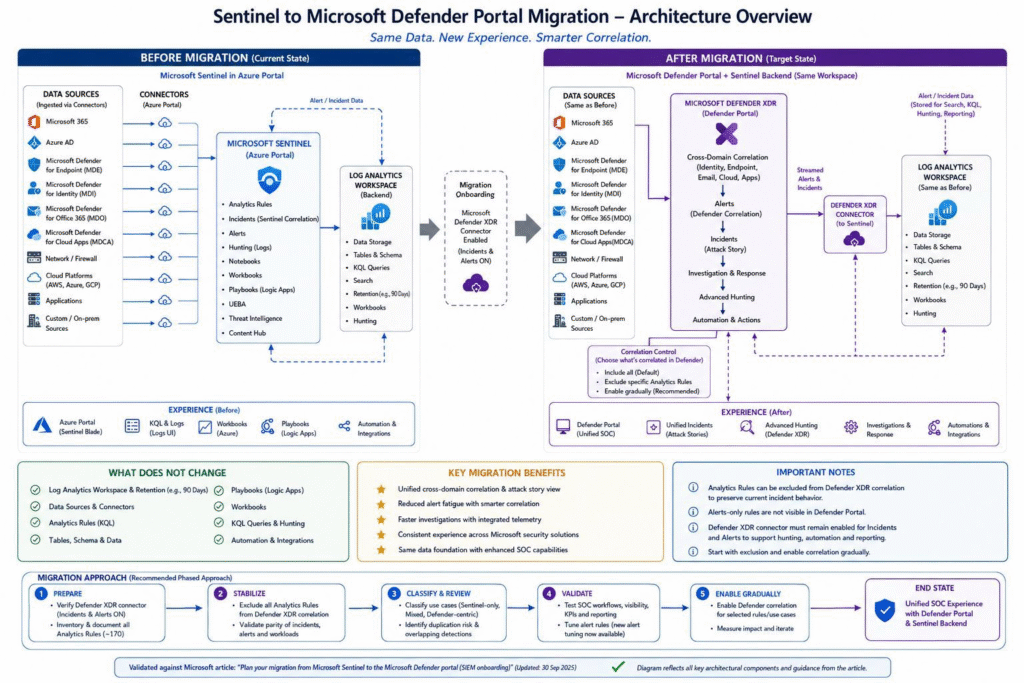

  • Beyond the Checklist: Migrating Microsoft Sentinel to the Defender Portal Without Losing Incident Truth

    A Microsoft Sentinel migration can be technically successful and still make the SOC weaker. The workspace connects, incidents appear, and the dashboard looks healthy—yet an analyst can no longer see the same evidence, an automation rule silently stops matching, or two connectors create competing versions of the same attack.

    That is why I do not treat the move from the Azure portal to the Microsoft Defender portal as a portal migration. I treat it as an incident-truth migration: a controlled transfer of the data, permissions, detection logic, automation and human context that allow a SOC to decide what happened and what to do next.

    Microsoft has made the direction clear. Sentinel is now part of the unified Defender experience, and Microsoft states that Sentinel will no longer be supported in the Azure portal after March 31, 2027. The date creates urgency, but urgency should not turn onboarding into a checkbox exercise.

    The real migration question is not “Did the workspace connect?” It is “Can the SOC still reach the same defensible conclusion from the same attack?”

    Why the usual migration checklist is incomplete

    A normal checklist records whether a connector was enabled, a rule was updated or a playbook was tested. Those are necessary tasks, but they do not prove operational continuity. Security operations are built on relationships: one identity has access to a table; one rule converts events into an alert; one correlation engine groups alerts into an incident; one automation rule enriches it; and one analyst interprets the result.

    Change any link in that chain and the final incident may tell a different story. The danger is subtle because the platform can remain “green” while the meaning of its output changes.

    • A connector can be healthy while sending duplicate alerts through a second route.
    • A KQL query can run successfully while returning fewer entities after a schema change.
    • An automation rule can remain enabled while its condition no longer matches the new incident provider or description.
    • A playbook can complete successfully while enriching a different incident shape than the analyst expects.
    • An analyst can open the Defender portal while Unified RBAC hides information that was visible through Azure RBAC.

    To expose those failures, I use a framework based on five operational ledgers.

    The Incident Truth Continuity Framework

    Think of the SOC as maintaining five ledgers. Each ledger records one part of the truth. The migration passes only when all five reconcile before and after onboarding.

    LedgerWhat must remain trueTypical hidden failureEvidence to retain
    Signal ledgerThe expected events, alerts, entities and incidents arrive once, with the required fields.Duplicate ingestion, missing entities or a primary-workspace routing surprise.Connector inventory, event counts, sample incident lineage and cost baseline.
    Identity ledgerEvery persona can see and perform exactly what its job requires—no more and no less.Unified RBAC activation changes effective access or exposes aggregated identity context.Persona-to-permission matrix and signed access test results.
    Detection ledgerRules preserve their intent, entity mapping, severity and incident outcome.A syntactically valid query produces a semantically different alert.Rule fingerprints, test fixtures and before/after alert comparisons.
    Action ledgerAutomation and playbooks trigger once, in the right order, with the correct payload.A removed condition or changed incident field causes silent non-execution.Trigger matrix, run history, idempotency test and rollback procedure.
    Analyst ledgerTier 1, Tier 2 and Tier 3 analysts can reach the same conclusion within an acceptable time.The incident exists, but context moved, merged or became harder to interpret.Timed walkthroughs, analyst decisions and exception notes.

    This is deliberately different from counting completed tasks. A task says, “Update the rule.” A ledger asks, “What evidence proves that the rule still expresses the original detection intent?”

    Step 1: Freeze the meaning before changing the machinery

    Before onboarding, capture more than exported configuration. Create a truth baseline: a small, version-controlled evidence pack showing how the current SOC behaves.

    1. Inventory the paths. Map each source to its connector, table, parser, analytics rule, automation rule, playbook, workbook, API consumer and owner.
    2. Fingerprint critical detections. For every high-value rule, record its KQL, lookback, threshold, entity mappings, incident settings and expected sample output.
    3. Capture representative incidents. Select benign test cases for identity, endpoint, email and cloud workloads. Preserve the alerts, entities, timeline, severity and analyst decision.
    4. Measure the human workflow. Record how long analysts take to triage, investigate, contain and close those cases.
    5. Export the control plane. Store rules, playbooks, workbooks, watchlists, parsers and relevant configuration in version control with a dated release tag.

    A configuration export tells you what existed. A truth baseline tells you what that configuration did. You need both.

    Step 2: Build a signal lineage map before enabling connectors

    Duplicate alerts are rarely caused by one obviously broken connector. They are caused by two valid routes representing the same security event. Defender for Cloud is a good example: Microsoft advises reviewing legacy subscription-based connectors and analytics rules when Defender XDR incident integration becomes the authoritative route.

    For every major signal, draw a one-line lineage:

    Source → ingestion route → table/alert → detection or correlation → incident → automation → downstream system

    Then assign one authoritative incident-creation path. Do not merely compare alert counts. Compare the identity of the alert, its entities, the incident that owns it and the automation it triggers. A duplicated event may be a cost problem; a duplicated incident is also a decision problem because two analysts can act on two competing versions of the same attack.

    Step 3: Treat the primary workspace as an incident-routing decision

    In a multi-workspace environment, selecting the primary workspace is not an administrative preference. It decides where Defender XDR alerts and incidents synchronize and where some portal experiences are available. Microsoft documents one primary workspace and multiple secondary workspaces, with important differences in correlation and feature behavior.

    Choose the primary workspace by answering operational questions:

    • Which SOC owns the enterprise incident queue?
    • Where should Defender XDR incidents be synchronized?
    • Which workspace contains the automation that must act on those incidents?
    • Which team owns cross-workspace hunting and workbook dependencies?
    • What data-residency or separation requirements prevent centralization?

    Document the decision as an architecture record. If the answer is based only on “this was our first workspace,” the design is not finished.

    Step 4: Reconcile permissions as personas, not role names

    Azure RBAC and Microsoft Defender Unified RBAC are not usefully compared by matching role names on a spreadsheet. Compare effective actions for real personas.

    PersonaMinimum proof
    Tier 1 analystCan view the assigned queue, inspect alerts and entities, add comments and change permitted incident fields.
    Tier 2 investigatorCan hunt across the intended data scope, inspect entity timelines and run approved response actions.
    Tier 3 responderCan perform containment actions and invoke the required playbooks without receiving unnecessary administrative access.
    Detection engineerCan create, test and manage rules in the intended workspaces without gaining unrelated response permissions.
    Platform administratorCan manage connectors and configuration while access to case content remains appropriately constrained.
    Auditor or DPOCan verify control evidence and data boundaries without operational modification rights.

    Test with dedicated non-administrator accounts. A Global or Security Administrator account can hide permission defects because its broader privileges make a broken custom-role design appear functional.

    Step 5: Test detection intent, not only KQL execution

    A query returning results is not proof of detection parity. For each critical analytics rule, test four layers:

    1. Data parity: Are the required fields populated at comparable rates?
    2. Logic parity: Does the same test fixture cross the same threshold?
    3. Entity parity: Are accounts, hosts, IP addresses, mailboxes and cloud resources mapped correctly?
    4. Incident parity: Does the alert join, merge or remain separate as intended under Defender correlation?

    Record the result as a before/after diff. Pay particular attention to rules that create incidents from alerts now supplied through Defender XDR, rules that rely on provider names, and cross-workspace rules whose data location changes after a primary workspace is selected.

    Step 6: Assume automation can fail silently

    Automation deserves its own migration workstream because “enabled” does not mean “effective.” Microsoft documents changes that affect incident-provider conditions, description-based conditions and playbook actions that add or remove alerts from incidents after onboarding.

    Create a trigger-contract table for every important automation path:

    Contract itemQuestion to prove
    TriggerWhich alert or incident event starts the automation?
    ConditionWhich exact field and value must match in the Defender incident model?
    PayloadWhich fields and entities does the playbook require?
    IdempotencyWhat happens if correlation updates the incident and the automation runs again?
    Failure pathWho is notified when the playbook is skipped, throttled or fails?
    EvidenceWhich run ID, comment, tag or ticket proves completion?

    Also test timing. An incident can appear in the Defender portal before every synchronized Sentinel action is available. A manual test performed several minutes later may pass while the production automation that ran immediately after creation failed.

    Step 7: Validate the analyst’s conclusion

    The final test is a blind operational walkthrough. Give analysts the same benign scenario in the old and new experiences without telling them what difference to expect. Ask them to identify:

    • What happened?
    • Which user, device or workload is affected?
    • Which evidence supports the conclusion?
    • What action should be taken?
    • What information is missing or harder to find?

    Measure decision parity, not click parity. The Defender portal may—and should—change the route analysts take. What must remain stable is their ability to reach a correct, explainable and timely decision.

    The eight evidence gates

    I recommend governing the migration through eight gates. No gate passes because a meeting was held; it passes when the named evidence exists.

    GateRequired evidencePrimary owner
    1. ScopeApproved component inventory, objectives, exclusions and risk register.Security Architect
    2. BaselineVersioned configuration export, representative incidents and hunting results.Security Engineer
    3. GovernancePrivacy review, licensing record, CMK decision and signed residual risks.DPO / CISO
    4. DesignSignal lineage, primary workspace decision, RBAC mapping and remediation design.Architect / IAM Lead
    5. BuildPeer-reviewed changes for connectors, rules, automation, playbooks, workbooks and APIs.Engineering Leads
    6. Technical parityPassed connector, detection, automation, hunting, workbook and integration tests.Engineer / Analyst
    7. Operational parityTier 1–3 walkthroughs, ITSM validation and accepted limitations in runbooks.SOC Lead
    8. CompletionArchitect and CISO approval, rollback closure and a scheduled 30-day review.Project Lead

    A practical stop/go rule

    Do not cut over when the dashboard is green. Cut over when the five ledgers reconcile.

    • Go: Critical signals arrive once, detections preserve intent, role tests pass, automation produces evidence, and analysts reach the expected conclusion.
    • Conditional go: A non-critical difference is documented, owned, time-bound and accepted by the correct risk owner.
    • Stop: Any critical incident can disappear, duplicate, lose required context, bypass automation or become invisible to its responsible analyst.

    The 30-day truth review

    Migration completion is not the end of validation. For 30 days, review the ledgers using production evidence:

    • Alert and incident volumes by source, severity and workspace.
    • Duplicate and orphan incident rates.
    • Automation trigger, failure and retry rates.
    • Playbook duration and downstream ticket consistency.
    • Analyst triage time and escalation quality.
    • Access exceptions and emergency privilege use.
    • Data-volume or cost deviations from the baseline.

    This review catches failures that laboratory testing rarely reproduces: unusual entity combinations, delayed connectors, cross-workspace investigations, shift handovers and automation retries under real load.

    Final thought

    The Defender portal promises a more unified operating experience, but unification changes the boundaries between tools that SOC teams previously managed separately. That is exactly why the migration must be judged at the level of the incident—not at the level of the portal.

    If the same attack produces one authoritative incident, preserves the required evidence, invokes the correct response and leads the analyst to the same defensible conclusion, the migration has succeeded. Everything else is only configuration progress.

    Official Microsoft references

  • Microsoft Sentinel to Defender Portal Migration — Complete LLD and Execution Plan

    What this achieves: A unified SOC platform with a single incident queue, automatic multi-stage attack correlation, cross-platform Advanced Hunting, unified entity pages, and no additional cost.

    Before You Start — Key Decisions to Lock In

    Get sign-off on all of the following before touching anything technical:

    Decision ItemOptionsRecommendedSign-Off Required From
    Proceed with migrationYes / No / PhasedYes — full migrationExecutive Sponsor
    Migration windowBusiness hours / After-hours / Maintenance windowAfter-hours maintenance windowChange Advisory Board
    Data privacy policy changeAccept Defender XDR policies / DeferAccept — documented risk acceptanceDPO / Legal / CISO
    CMK encryption scope reductionAccept / Defer migrationDocument as accepted riskCISO / Data Owner
    Primary workspace designationOne per tenantDesignate and documentSecurity Architect
    Workspace Manager replacementCI/CD Pipelines / Multitenant PortalCI/CD (GitHub/Azure DevOps)Security Architect
    API migration strategyMigrate all / Migrate incrementallyIncremental by integration prioritySecurity Architect + Dev Lead
    IdentityInfo table-level RBAC removalAccept loss / Design compensating controlDesign compensating control firstSecurity Architect + IAM Lead

    ⚠️ CMK Notice: CMK-encrypted alerts and incidents will permanently lose CMK encryption after onboarding. Obtain written acceptance from your CISO or Data Owner before proceeding.

    Phase Overview

    #PhasePrimary AudienceEstimated Duration
    1Read Official GuidanceSecurity Architects1–2 Days
    2Pre-RequisitesSecurity Architects / Engineers3–5 Days
    3Plan Component MigrationSecurity Architects1–2 Weeks
    4DesignSecurity Architects / Engineers1–2 Weeks
    5ImplementationSecurity Engineers3–7 Days
    6TestingSecurity Engineers / SOC Analysts3–5 Days
    7ValidationAll Roles2–3 Days
    8Sign-Off & CompletionAll RolesOngoing

    Total estimated timeline: 4–6 weeks

    Phase 1 — Read the Official Docs

    Read and understand all five articles before planning anything:

    ArticlePurposeKey Takeaway
    Plan for unified security operations in the Defender portalArchitecture overview and role assignmentsMicrosoft Sentinel Contributor role auto-assigned to MTP and WDATP apps upon onboarding
    Deploy for unified security operationsStep-by-step reference for new and existing customersUse as deployment reference even for existing Sentinel customers
    Connect Sentinel to the Defender portalOnboarding prerequisites and procedureNon-E5 customers need an extra manual step to trigger the connection
    Data security and retention — Defender XDRDefender XDR data governance policiesThese policies replace Sentinel policies once the Defender portal is used
    Alert schema differences: Standalone vs XDR connectorSchema changes when switching connectorsCritical for updating KQL queries, analytics rules, and workbooks

    Phase 2 — Pre-Requisites (3–5 Days)

    Identity & Permissions

    PrerequisiteWhat to CheckHow to VerifyWho
    Subscription Owner or User Access AdministratorOnboarding user must hold one of these rolesAzure portal > Subscriptions > IAM > Check role assignmentsSecurity Architect
    Microsoft Sentinel workspace is activeWorkspace must be in a healthy, active stateAzure portal > Microsoft Sentinel > Check workspace statusSecurity Engineer
    All Sentinel users have Azure AD accountsUsers needing Defender portal access must have valid Azure AD accountsAzure AD > Users > Verify accounts for SOC teamIAM Lead
    Microsoft Threat Protection app exists in tenantAuto-assigned Sentinel Contributor role on onboardingAzure AD > Enterprise Applications > Search Microsoft Threat ProtectionSecurity Engineer
    WindowsDefenderATP app exists in tenantAuto-assigned Sentinel Contributor role on onboardingAzure AD > Enterprise Applications > Search WindowsDefenderATPSecurity Engineer

    Configuration Backup (Take Before Any Onboarding Step)

    ⚠️ This is your only reliable rollback point. Do not skip.

    ComponentExport MethodStorage Location
    Analytics RulesSentinel API: GET /analyticsRules or export via Azure portalGit repository
    Automation RulesSentinel API: GET /automationRulesGit repository
    Playbooks (Logic Apps)Azure portal > Logic Apps > Export (ARM template)Git repository
    WorkbooksAzure portal > Sentinel > Workbooks > Export each custom workbookGit repository
    WatchlistsAzure portal > Sentinel > Watchlist > Export each listGit repository
    Threat Intelligence IndicatorsSentinel API: GET /threatIntelligence/indicatorsGit repository
    Hunting QueriesAzure portal > Sentinel > Hunting > Export saved queriesGit repository
    Custom KQL FunctionsAzure portal > Logs > Functions — document each functionGit repository

    Phase 3 — Plan Your Component Migration (1–2 Weeks)

    Data Connectors

    Connector CategoryMigration BehaviourAction Required
    Microsoft Defender XDR ConnectorCRITICAL — must be active with incidents and alerts turned onVerify connector state; schedule enablement if not active
    Defender for Cloud (Tenant-based)Risk of duplicate incidents if not handledPlan deduplication action — document in runbook
    Defender for Cloud (Subscription/Legacy)Must opt out of incident/alert sync to DefenderSchedule opt-out step in implementation phase
    Defender for Cloud Apps / Endpoint / Identity / Office 365Hidden in Defender portal Data Connectors page post-onboardingInform team; confirm they remain listed in Azure portal
    Third-party / Custom ConnectorsContinue operating without interruptionNo migration action needed; verify after onboarding

    Analytics Rules

    Rule TypeMigration BehaviourPlan Action
    Scheduled Analytics RulesFully supported in Defender portalInventory all rules; flag alert-only rules for review
    Fusion RuleDISABLED on onboarding — replaced by Defender XDR engineAccept; document replacement; verify correlation post-cutover
    Microsoft Incident Creation RulesDEACTIVATED on onboarding to prevent duplicatesAccept; document; do not re-enable
    Alert-Only Rules (no incident creation)Alerts NOT visible in Defender portal incident queueDecide per rule: enable incident creation or leave as-is
    NRT (Near Real-Time) RulesSupported in Defender portalNo action needed
    Custom Detection Rules (Defender XDR)Can now query both Defender XDR and Sentinel tablesIdentify scheduled rules that could migrate to custom detections

    Automation Rules — Items to Audit

    Item to CheckWhat to Look ForAction Required
    Incident Provider conditionsRules filtering on “Microsoft Sentinel” or “Microsoft 365 Defender”Must be updated — all incidents become provider “Microsoft XDR”
    Description field conditionsField removed from SecurityIncident table post-onboardingReplace with Incident title, Analytic rule name, Tags, or Severity
    Incident title conditionsMay break if rule relied on auto-generated titlesReplace with analytic rule name + tags
    Updated By conditions“Updated by: Microsoft 365 Defender” no longer appliesReplace with “Updated by: Other”
    Multi-workspace rulesRules tied to secondary workspacesMust transfer to the primary workspace

    Playbooks — Capability Changes

    Playbook ActionSupported in Defender PortalPlan Decision
    Run playbook on incident (triggered)✅ YESNo change needed
    Run playbook manually on alert❌ NODocument: must use Azure portal
    Run playbook manually on entity❌ NODocument: must use Azure portal
    Add alerts to / remove alerts from incidents❌ NORemove these steps from any playbook; update runbooks
    Access incident Description field❌ NO (field removed)Update Logic App steps that reference this field
    Trigger latencyUp to 5 min delayUpdate SLA documentation; add retry logic if needed

    Risk Register

    RiskProbabilityImpactMitigation
    Duplicate incidents from Defender for Cloud connectorHigh if not handledHighPlan opt-out / deduplication action before onboarding
    Analytics rules querying deprecated schema fields breakMediumHighComplete schema difference review in Phase 4
    Automation rules firing on wrong incident scopeHigh if not updatedHighUpdate all incident provider conditions before go-live
    Playbooks referencing removed Description field failMediumMediumAudit all playbooks; update Logic App steps
    IdentityInfo table-level RBAC access control gapLowHighDesign and implement compensating control in Phase 4
    Analyst confusion during transition periodHighMediumMandatory training; updated runbooks
    Data residency non-compliance in Defender portalLowCriticalDPO sign-off in Phase 2; verify regions before onboarding

    Phase 4 — Design (1–2 Weeks)

    Schema Differences — KQL & API Updates Required

    Schema ElementOld Schema (Standalone)New Schema (XDR Connector)Design Action
    Alert product namesalertProductNames (direct field)Requires ?$expand=alerts on GET requestUpdate all API calls; update KQL referencing this field
    Provider nameAzure SentinelMicrosoft XDRUpdate any filters referencing Azure Sentinel
    Service sourceNot presentserviceSource field availableOptional: enrich analytics rules with new field
    Detection sourceNot presentdetectionSource field availableOptional: enrich analytics rules with new field
    IdentityInfo (Advanced Hunting)Sentinel Log Analytics fieldsUnified Defender XDR + Sentinel fields — some renamedAudit all IdentityInfo queries for renamed/removed fields

    Automation Rules — Redesign Decisions

    ElementOld ApproachNew Approach
    Incident scopeFilter by Incident Provider = Microsoft SentinelUse Analytic rule name as scope limiter
    Description field conditionFilter on Description field contentReplace with Incident title, Analytic rule name, Tags, or Severity
    Title conditionsMatch on incident titleReplace with analytic rule name + tags
    Updated By condition“Updated by: Microsoft 365 Defender”Replace with “Updated by: Other”

    Playbook Redesign

    Affected Playbook ActionDesign Solution
    Steps using incident Description fieldAdd a Compose step: concat(incident.title + | Severity: + incident.severity + | Entities: + entities list)
    Steps adding/removing alerts from incidentsRemove these steps entirely
    Manual alert / entity playbook runsKeep available in Azure portal; document in SOC runbooks
    Latency-sensitive playbooks (under 5-min SLA)Design retry logic in Logic App; update SLA documentation
    ServiceNow incident sync (description field)Build description string from title + severity + alert product names via Logic App Compose step

    API Integration Migration Priority

    Integration TypeCurrent APITarget APIPriority
    Incident CRUD operationsSecurityInsights APIGraph API /security/incidentsHigh
    Alert operationsSecurityInsights APIGraph API /security/alerts_v2High
    ServiceNow incident URL fieldincidentUrl (Sentinel portal)providerIncidentUrl for Defender portal deep linkHigh
    Advanced Hunting queriesSecurityInsights APIGraph API /security/runHuntingQueryMedium
    Analytics rule managementSecurityInsights APIKeep SecurityInsights API — fully supportedLow / No change

    Phase 5 — Implementation (3–7 Days)

    ⚠️ Schedule onboarding during an after-hours, low-activity maintenance window. Have a secondary analyst monitoring the Azure portal for 30 minutes post-onboarding. Steps must be completed in order — Steps 1 and 2 must happen before workspace onboarding.

    StepActionWhere
    1Configure Defender for Cloud connector deduplicationAzure portal > Sentinel > Data Connectors > Tenant-based Defender for Cloud
    2Opt legacy Defender for Cloud connector out of incident/alert syncAzure portal > Sentinel > Data Connectors > Legacy connector
    3Enable Microsoft Defender XDR connector (incidents + alerts + all Defender product sources)Azure portal > Sentinel > Data Connectors > Microsoft Defender XDR
    4Confirm connector shows Connected; test KQL against SecurityAlert tableAzure portal > Sentinel > Logs
    5Update all playbooks — replace Description field references with Compose stepAzure portal > Logic Apps
    6Confirm maintenance window active; secondary analyst monitoringAzure portal incident queue
    7Execute workspace onboarding (non-E5: perform additional manual connection step)Defender portal
    8Wait 5 minutes — do not make changes during propagation
    9Confirm workspace shows as connected in Defender portalDefender portal
    10Verify Sentinel incidents appear in Defender portal incident queueDefender portal > Incidents

    Playbook Description Field Compose Step:

    concat(triggerBody()?['object']?['properties']?['title'], ' | Severity: ', triggerBody()?['object']?['properties']?['severity'])

    Phase 6 — Testing (3–5 Days)

    Data Connector Tests

    Test IDWhat to TestExpected Result
    DC-01Defender XDR connector active with incidents and alertsStatus: Connected; incidents and alerts flowing
    DC-02No duplicate incidents from Defender for CloudZero duplicate incidents in both portals
    DC-03Third-party connectors continue flowingData present and fresh within expected ingestion latency
    DC-04Hidden connectors still listed in Azure portalStill listed and active in Azure portal
    DC-05Alert schema — alertProductNames accessiblePopulated correctly via Graph API

    Analytics Rules Tests

    Test IDWhat to TestExpected Result
    AR-01Scheduled rules fire and create incidentsIncident appears in Defender portal incident queue
    AR-02Fusion rule is disabledFusion rule shows as Disabled
    AR-03Microsoft Incident Creation rules deactivatedAll show as Inactive
    AR-04Alert-only rules visibility per designAlert NOT in Defender portal queue; accessible in Advanced Hunting
    AR-05Updated KQL schema queries return expected resultsResults match pre-migration baseline
    AR-06Alert tuning available for Sentinel alertsTune alert option available and functional

    Automation Rules Tests

    Test IDWhat to TestExpected Result
    AUT-01Automation rule fires on new incidentRule executes within 10 minutes of incident creation
    AUT-02Analytic rule name condition scopes correctlyRule fires only for the specified analytics rule incidents
    AUT-03No automation rule fires on Description field conditionRule does not fire; no errors
    AUT-04Incident title change does not break automationAutomation fires correctly using analytic rule name condition
    AUT-05Updated by Other condition fires correctlyRule fires correctly when incident updated by Defender XDR processes
    AUT-06Multi-workspace automation rules fire in correct workspaceAutomation rules execute in the workspace they are assigned to

    Playbook Tests

    Test IDWhat to TestExpected Result
    PB-01Triggered playbook runs on incident from Defender portalPlaybook executes successfully within 5–10 minutes
    PB-02Composited description field populates correctly in ITSMDescription field populated with title + severity + entities
    PB-03Playbook does not fail on removed add/remove alert stepsNo failed runs; Logic App execution history shows Success
    PB-04Manual playbook run confirmed in Azure portalExecutes successfully; NOT available from Defender portal
    PB-05Playbook triggering latency within SLAAll executions within updated SLA window
    PB-06Logic App version history available for rollbackPrevious versions visible and restorable

    Workbook Tests

    Test IDWhat to TestExpected Result
    WB-01All custom workbooks load without errors in Defender portalAll workbooks load; no missing data errors
    WB-02IdentityInfo workbooks updated for new field namesData renders correctly with no “column not found” errors
    WB-03Workbooks querying SecurityAlert table still workData loads correctly despite table not appearing in schema browser
    WB-04Workbook data freshnessData within expected ingestion latency

    Advanced Hunting & UEBA Tests

    Test IDWhat to TestExpected Result
    AH-01All existing Sentinel KQL tables queryable in Advanced HuntingAll queries return data; no “table not found” errors
    AH-02Bookmarks migrated to Threat Management > HuntingAll pre-migration bookmarks visible and accessible
    AH-03IdentityInfo table unified field names in Advanced HuntingFields return data; updated queries with new field names work
    AH-04Cross-platform query (Sentinel + Defender XDR)Query returns results from both data sources in one response
    AH-05SecurityAlert table queryable despite not in schema browserQuery executes and returns results
    AH-06UEBA entity pages load with unified contextEntity page shows combined Sentinel + Defender XDR context

    Incident Queue & Correlation Tests

    Test IDWhat to TestExpected Result
    IQ-01Unified incident queue shows Sentinel and Defender XDR incidentsIncidents from both sources appear in the same queue
    IQ-02Incident provider is Microsoft XDR for all incidentsAll show Microsoft XDR as provider
    IQ-03Multi-stage correlated incident testSingle unified incident with alerts from multiple domains correlated
    IQ-04No Sentinel alerts from alert-only rules visible in queueNot present in queue; access via Advanced Hunting only
    IQ-05Incident comment add/edit behaviourComment added successfully; editing not supported in Defender portal
    IQ-06Closed incident behaviour — new alerts create new incidentNew incident created; closed incident remains closed

    Phase 7 — Validation (2–3 Days)

    SOC Analyst Walkthrough

    TierWorkflow Steps
    Tier 1 — TriageLog into Defender portal → Navigate incident queue → Filter by severity → Open incident → Review correlated alerts → Classify and assign
    Tier 2 — InvestigationOpen a medium/high severity incident → Navigate entity pages → Review UEBA context → Run Advanced Hunting query from incident → Add investigation note
    Tier 3 — ResponseTrigger a response playbook → Confirm playbook executes → Verify ITSM ticket created with correct data

    Known Limitations — Accept and Document

    Known LimitationWorkaround
    Similar Incidents feature not available in Defender portalUse Advanced Hunting to find similar incidents by entity/tactic
    Incident Tasks not availableUse external ITSM task management; document task steps in incident comments
    Manual playbook run on alert/entity not in Defender portalRun from Azure portal; document in SOC runbooks
    Add entity to Threat Intelligence — Azure portal onlyNavigate to Azure portal for this specific action
    Edit incident comments not supportedAdd new comments; archive original comment content externally
    Programmatic/manually created incidents not synced to Defender portalAccess via Azure portal or API; accepted as deliberate design
    Table-level RBAC on IdentityInfo removedCompensating control implemented per design in Phase 4

    Phase 8 — Migration Complete Checklist

    The migration is officially complete when all of the following are signed off:

    Completion GateSign-Off AuthorityStatus
    All Phase 6 testing tests marked PassSecurity Engineering Lead
    All Phase 7 validation items confirmedSOC Lead
    All success criteria marked PassSecurity Architect
    SOC analyst training completedSOC Lead
    ITSM/ServiceNow integration confirmedSecurity Engineer / ITSM Admin
    Risk register reviewed; residual risks acceptedCISO
    Post-migration review meeting scheduled within 30 daysProject Lead
    Azure portal decommission plan agreed (if applicable)Security Architect + CISO

    Source: learn.microsoft.com/en-us/azure/sentinel/move-to-defender | Document by Surya PS, CISSP | sunexplains.com

  • CISSP Study Guide (2026): Complete Roadmap for All 8 Domains

    The CISSP (Certified Information Systems Security Professional) is the world’s most recognised advanced cybersecurity certification, awarded by (ISC)². It validates your ability to design, implement, and manage a best-in-class cybersecurity programme across eight critical security domains. This cissp study guide maps every domain, links to every in-depth article on SunExplains, and gives you a clear, structured roadmap from first concept to exam-ready confidence.

    Whether you are starting your CISSP journey, deep in domain-by-domain revision, or looking for quick reference material before exam day, this page is your central navigation hub. Use the domain sections to jump directly to the articles you need, or follow the recommended study sequence from beginning to end.

    What is CISSP? Understanding the Certification

    CISSP is an advanced-level certification that demonstrates deep technical knowledge and managerial competence in information security. It is issued by (ISC)² and is widely regarded as the benchmark credential for senior security professionals — CISOs, security architects, security managers, and senior engineers.

    The exam tests 125–175 questions in a Computerised Adaptive Testing (CAT) format for English-language candidates, covering all eight CISSP domains. Candidates must have a minimum of five years of cumulative paid work experience in two or more of the eight domains to earn the full certification. Those without the required experience can pass the exam and become an Associate of (ISC)² while working toward the experience requirement.

    Who Should Pursue the CISSP?

    The CISSP is designed for experienced security practitioners who operate at a strategic and managerial level. It is the right certification for you if you are working in or moving toward roles such as: Chief Information Security Officer (CISO), Security Architect, Security Manager, IT Director, Security Auditor, or Security Consultant. If you are earlier in your career, the CISSP provides a definitive learning framework that elevates your thinking from tactical execution to enterprise risk management.

    How to Use This CISSP Study Guide

    This cissp study guide is structured as a navigation and synthesis hub — not a textbook replacement. Each domain section contains a short summary of what the domain covers, the key concepts you need to understand, and direct links to the SunExplains articles that go deep on each topic. Use the Quick Revision Resources section for visual aids and condensed notes. Use the FAQ section for rapid recall of high-value exam concepts.

    Study approach that works: Start with Domain 1 to build your governance and risk management foundation. Then follow the domain sequence, spending additional time on the domains with the highest exam weighting (Domains 1, 3, and 5). Use the Elite Framework content for exam-focused revision once you have covered the conceptual material.

    The 8 CISSP Domains at a Glance

    The CISSP CBK (Common Body of Knowledge) is organised into eight domains, each representing a core area of information security practice. Every exam question maps to one of these domains, and your study plan should ensure coverage of all eight.

    DomainNameExam Weight
    1Security and Risk Management16%
    2Asset Security10%
    3Security Architecture and Engineering13%
    4Communication and Network Security13%
    5Identity and Access Management (IAM)13%
    6Security Assessment and Testing12%
    7Security Operations13%
    8Software Development Security10%

    Domain 1: Security and Risk Management

    Domain 1 is the most heavily weighted CISSP domain at 16% of the exam. It establishes the governance, risk, and compliance foundation that underpins every other domain. You cannot approach CISSP as a purely technical certification — Domain 1 ensures you understand how security decisions connect to business objectives, legal obligations, and ethical responsibilities.

    Core topics include: CIA triad and foundational security concepts, security governance and business alignment, security policies, standards, procedures, and guidelines, risk management processes and frameworks, legal and regulatory compliance, professional ethics, and the (ISC)² Code of Ethics.

    Domain 1 Articles on SunExplains

    Domain 2: Asset Security

    Domain 2 covers how organisations classify, own, handle, and protect their information assets throughout their lifecycle. The core insight in this domain is that security controls must match the classification and sensitivity of the asset they protect. Over-protecting low-value assets wastes resources; under-protecting high-value assets creates risk.

    Core topics include: data classification schemes, information and asset ownership, data lifecycle management, data security controls, privacy protection, and the relationship between asset value and control selection.

    Domain 2 Articles on SunExplains

    Domain 3: Security Architecture and Engineering

    Domain 3 is one of the most technically rich domains in the cissp study guide. It covers the design principles, models, and technologies used to build secure systems. This includes security architecture frameworks, cryptography fundamentals, PKI, and secure design principles like defence-in-depth, zero trust, and least privilege.

    Core topics include: security models (Bell-LaPadula, Biba, Clark-Wilson), trusted computing concepts, cryptography principles and algorithms, PKI and digital certificates, secure system design, vulnerability and countermeasure selection, and physical security design.

    Domain 3 Articles on SunExplains

    Domain 4: Communication and Network Security

    Domain 4 covers the design and protection of network infrastructure and communications channels. For CISSP candidates, this domain bridges the gap between traditional networking knowledge and the security controls that protect those networks at every layer of the OSI model.

    Core topics include: network architecture and design principles, OSI and TCP/IP model security implications, secure network components, wireless network security, communication channel protection, network attacks and countermeasures, and third-party connectivity security.

    Domain 4 Articles on SunExplains

    Domain 5: Identity and Access Management (IAM)

    Domain 5 covers how organisations control who can access what, under which conditions, and how those access decisions are made and enforced. IAM is one of the highest-frequency CISSP exam topics because it sits at the intersection of technical controls and business policy decisions.

    Core topics include: identity management lifecycle, authentication methods and factors, authorisation mechanisms and models, access control models (MAC, DAC, RBAC, ABAC), identity federation and SSO, privilege management, and the principle of least privilege in practice.

    Domain 5 Articles on SunExplains

    Domain 6: Security Assessment and Testing

    Domain 6 covers how organisations validate that their security controls are working as intended. The core principle is that security cannot be assumed — it must be verified through structured assessment and testing programmes. This domain covers both the technical testing methods and the governance processes that make security assurance meaningful.

    Core topics include: assessment and test strategies, vulnerability assessment, penetration testing, log review and analysis, synthetic transactions, code review, internal and third-party audits, security control testing, and the relationship between testing and risk management.

    Domain 6 Articles on SunExplains

    Domain 7: Security Operations

    Domain 7 is the operational heart of the CISSP. It covers the day-to-day activities of a security operations team — from incident response and investigation through to disaster recovery and physical security. This is where the governance decisions from Domain 1 become operational reality.

    Core topics include: incident management and response, investigations and digital forensics, disaster recovery planning and business continuity, physical security controls, personnel security, security operations centre management, change management, and monitoring and logging.

    Domain 7 Articles on SunExplains

    Domain 8: Software Development Security

    Domain 8 closes the CISSP framework by addressing security in the software development lifecycle. Modern organisations build and consume enormous amounts of software, and vulnerabilities introduced during development represent one of the most persistent and costly attack surfaces in enterprise security.

    Core topics include: software development lifecycle (SDLC) security, secure coding practices, database security, software vulnerabilities and countermeasures, code review and testing, acquired software assurance, and security assessment of development environments.

    Domain 8 Articles on SunExplains

    Recommended Study Sequence

    Use this sequence to structure your CISSP preparation. The order is designed to build conceptual foundations before introducing technical depth, and to group related domains for reinforced learning.

    Phase 1 — Foundation (Weeks 1–3)

    1. CIA Triad and Security Concepts — establish the foundational vocabulary
    2. Domain 1 Overview — understand the governance and risk management framework
    3. Security Governance and Business Alignment — connect security to organisational objectives
    4. Security Risk Management — master the risk management process end to end

    Phase 2 — Governance Depth (Weeks 4–5)

    1. Security Policies, Standards, Procedures, and Guidelines
    2. Security Frameworks Compared
    3. Responsibility, Accountability, Due Care, and Due Diligence
    4. Legal, Regulatory, and Compliance
    5. Continuous Risk Monitoring

    Phase 3 — Asset, Architecture, and Cryptography (Weeks 6–8)

    1. Asset Classification — Domain 2 foundation
    2. Information Ownership and Asset Management
    3. Data Security
    4. Domain 3: Security Architecture and Engineering
    5. PKI and Digital Certificates
    6. Cryptographic Applications

    Phase 4 — Networks, IAM, and Assessment (Weeks 9–11)

    1. Domain 4: Network Security
    2. Domain 5: Identity and Access Management
    3. Managing Identity and Authentication
    4. Controlling and Monitoring Access
    5. Domain 6: Security Assessment and Testing

    Phase 5 — Operations and Development (Weeks 12–14)

    1. Domain 7: Security Operations
    2. Managing Security Operations
    3. Incident Response
    4. Disaster Recovery Planning
    5. Investigations and Ethics
    6. Domain 8: Software Development Security

    Quick Revision Resources

    Use these resources for condensed revision, visual reinforcement, and exam-day mental preparation alongside this cissp study guide.

    • CISSP Notes — condensed, high-signal study notes organised for rapid review and recall across all domains
    • Visual Explanations — diagram-based explanations of complex CISSP concepts including architecture models, access control frameworks, and cryptographic processes
    • CISSP Elite Framework — exam-focused revision content including mind maps, carousels, and exam essentials, structured to maximise retention in the final study phase

    Frequently Asked Questions: CISSP

    How long does it take to prepare for the CISSP exam?

    Most candidates with relevant work experience need between three and six months of dedicated study. Candidates with broad security experience across multiple domains may be ready in three months with focused preparation. Those newer to some domains, or studying alongside full-time work, should plan for five to six months. The key is consistent daily practice rather than intensive short bursts.

    What is the CISSP exam format?

    The English-language CISSP uses Computerised Adaptive Testing (CAT). The exam presents between 125 and 175 questions and ends when the system has determined your competency level with sufficient statistical confidence — either above or below the passing threshold. The CAT format means the exam adapts to your performance in real time, making time management and calm decision-making critical exam skills.

    What work experience is required for CISSP?

    Candidates must have a minimum of five years of cumulative paid work experience in two or more of the eight CISSP domains. A four-year college degree or an approved credential from the (ISC)² approved list can substitute for one year of experience. Candidates who pass the exam without meeting the experience requirement become Associates of (ISC)² and have six years to earn the required experience.

    Which CISSP domain is the hardest?

    Domain 3 (Security Architecture and Engineering) and Domain 5 (Identity and Access Management) are consistently rated as the most technically demanding by candidates. Domain 1 (Security and Risk Management), while conceptually broad, is often the domain where the most exam questions are answered incorrectly because candidates approach it too technically rather than from a management perspective. The correct mindset for most CISSP questions is that of a senior manager making risk-informed decisions, not a technician solving a specific problem.

    Is the CISSP worth it for my career?

    The CISSP is widely regarded as the most valuable credential for senior information security roles. It consistently appears in job requirements for CISO, security architect, security manager, and senior consultant positions. Beyond the credential itself, the process of preparing using a structured cissp study guide forces a comprehensive understanding of security across all eight domains — which directly improves your ability to make better security decisions in any role.

    What is the difference between CISSP and CISM?

    CISSP (offered by (ISC)²) covers both technical and managerial security knowledge across eight domains and is broadly recognised across all industries and geographies. CISM (offered by ISACA) focuses more narrowly on information security management and governance and is particularly valued in enterprise IT governance contexts. CISSP is generally considered the broader and more technically comprehensive of the two.

    Can I use this site as my primary CISSP study guide?

    SunExplains is designed as a high-quality conceptual supplement to official study materials. The domain guides, notes, visuals, and Elite Framework content are built to explain CISSP concepts clearly and help them stick — not to replace the (ISC)² official CBK or recognised study books. Use the SunExplains cissp study guide content alongside a primary text for maximum exam readiness.

    Where to Go Next

    Use these curated reading paths based on where you are in your CISSP preparation:

  • Microsoft Sentinel Guide: Complete Operations & Deployment (2026)

    Microsoft Sentinel is Microsoft’s cloud-native Security Information and Event Management (SIEM) and Security Orchestration, Automation, and Response (SOAR) platform. Built on Azure, it ingests security data at cloud scale, applies machine learning-driven analytics to detect threats, and automates response workflows — all without the infrastructure overhead of traditional on-premises SIEMs. This microsoft sentinel guide covers every operational stage — from your first deployment decision to advanced threat hunting.

    This guide is the central hub for all Microsoft Sentinel content on SunExplains. Whether you are planning a new Sentinel deployment, migrating from a legacy SIEM, building detection use cases, or optimizing an existing environment, this page maps the learning path and links you directly to the in-depth article for each topic.

    How to use this guide: Read each section in order if you are new to Sentinel. Jump directly to the section most relevant to your current challenge if you are already operational. Each section includes a short summary of the core concepts and a direct link to the full article.

    1. Understanding Microsoft Sentinel — Platform Overview

    Microsoft Sentinel is not just a log aggregation tool. It is a full security operations platform that combines SIEM capabilities (ingesting, correlating, and alerting on security data) with SOAR capabilities (automating response through playbooks and Logic Apps). Understanding what Sentinel is — and what it replaced — is the essential starting point before planning any deployment.

    This microsoft sentinel guide covers both the legacy architecture and the modern unified experience. The platform has undergone significant architectural evolution. The older “Classic” Sentinel experience has given way to a unified Security Operations Platform within Microsoft Defender XDR. Understanding this transition helps you avoid building on legacy patterns that are being deprecated.

    📖 Read next: The Journey from Old Sentinel to New Sentinel: A Story About One Rule at a Time — a practitioner’s account of what changed and what it means for your environment.

    📖 Also see: Microsoft Sentinel Platform Health Suite Explained: Monitoring and Diagnostics — how Sentinel monitors itself and surfaces operational health issues.

    2. Planning Your Sentinel Deployment

    Most Sentinel failures are decided before the first log is ingested. Deployment planning determines your workspace strategy, data residency, retention tiers, cost model, and integration architecture. Getting these decisions wrong early creates technical debt that is expensive to unwind.

    The most common planning mistakes include choosing a multi-workspace architecture when a single workspace would suffice, underestimating ingestion costs before going live, and failing to define a data classification tier before connecting connectors. A solid deployment plan answers three questions before anything is turned on: what data will you ingest, where will it live, and who will be responsible for what.

    📖 Read next: Microsoft Sentinel Deployment Planning Mistakes: How NOT to Plan Sentinel — a detailed breakdown of the most costly planning errors, with guidance on what good deployment planning looks like.

    3. Designing Your Sentinel Architecture

    Architecture design is where Sentinel deployments either scale well or collapse under their own complexity. The core architectural decisions involve workspace topology (single vs. multi-workspace), RBAC model, connector selection strategy, and integration with Microsoft Defender products.

    A poorly designed Sentinel architecture leads to fragmented visibility, cross-workspace query complexity, inconsistent alert fidelity, and unpredictable costs. The best Sentinel architectures are intentionally simple — they use the minimum number of workspaces needed and build complexity only when the operational need justifies it.

    📖 Read next: Microsoft Sentinel Architecture Mistakes: How NOT to Design Sentinel (2026 Guide) — a comprehensive review of every major architecture decision and what goes wrong when each is made incorrectly.

    4. Configuring Log Sources

    Log source design is one of the most consequential and most frequently mishandled areas of Sentinel configuration. The instinct to “collect everything” is understandable — but it creates noise, inflates costs, and makes detection work harder, not easier.

    Effective log source design requires a deliberate ingestion strategy: define which data sources map to which detection use cases before connecting anything. Prioritise high-fidelity sources (Azure AD sign-in logs, endpoint telemetry, network flow data) over raw verbose sources (full DNS logs, packet captures) that rarely produce actionable alerts.

    📖 Read next: Microsoft Sentinel Log Source Design Mistakes: How NOT to Configure Log Sources — covers the most common log source configuration errors and how to build an ingestion strategy that supports your detection goals.

    5. Building Detection Use Cases

    Detection engineering is the heart of Sentinel operations. An analytics rule is only as good as the threat model behind it. Without a structured use case library, most Sentinel deployments devolve into a collection of noisy, poorly tuned rules that generate alert fatigue and desensitise the team to real threats.

    Building effective detection use cases starts with threat modelling: identify your adversary profiles, map them to MITRE ATT&CK techniques, then build rules that detect behaviour rather than signatures. Each detection should have a documented hypothesis, a defined severity, and a clear escalation path.

    📖 Read next: Microsoft Sentinel Detection Use Case Mistakes: How NOT to Design Detections — a structured guide to detection design failures and how to build a use case library that produces high-fidelity alerts.

    6. Managing and Auditing Analytics Rules

    Analytics rules accumulate quickly. Without a systematic approach to rule lifecycle management, Sentinel environments become cluttered with outdated, duplicated, or broken rules that create false confidence. Regular analytics rule auditing is not optional — it is a core operational discipline.

    There are two complementary approaches to analytics rule hygiene on SunExplains: the conceptual framework for assessing rule quality, and the practical Python-based tooling for automated auditing at scale.

    📖 Read next: Microsoft Sentinel Analytics Rule Assessment Tool: How It Works — explains the assessment framework, what rule quality dimensions to evaluate, and how to prioritise rule improvements.

    📖 Also see: How to Audit Microsoft Sentinel Analytics Rules with Python — a hands-on technical guide to automating your analytics rule audit using Python and the Azure REST API.

    7. Threat Hunting in Microsoft Sentinel

    Threat hunting is proactive — it operates on the assumption that adversaries are already in your environment and that reactive alerting alone will not find them. Microsoft Sentinel’s hunting capabilities include saved queries, livestream hunting, bookmarks, and integration with Microsoft Defender threat intelligence.

    Effective threat hunting in Sentinel requires KQL proficiency, a structured hunting methodology (hypothesis-driven rather than exploratory), and a clear handoff process between hunting findings and incident response. The best SOC teams treat hunting as a regular operational cadence, not an ad-hoc activity triggered only during incidents.

    📖 Read next: Advanced Threat Hunting in Microsoft Sentinel: Techniques and Best Practices (2026 Guide) — covers KQL-based hunting methodologies, behavioural hunting patterns, and how to operationalise hunting in a mature SOC.

    8. Testing Your Sentinel Deployment

    Most Sentinel deployments are never properly tested. Teams connect data sources, enable analytics rules, and assume they are covered — only to discover coverage gaps during a real incident. Testing is the quality assurance layer that validates your detection logic, alert fidelity, and response playbooks before you need them.

    Sentinel testing encompasses three distinct activities: functional testing (do your rules fire when they should?), integration testing (are connectors actually ingesting data?), and adversarial testing (do your detections catch real attack techniques?). Each requires a different approach and different tooling.

    📖 Read next: Microsoft Sentinel Testing Mistakes: How NOT to Test Sentinel (and What to Do Instead) — a detailed guide to every testing failure pattern and a practical framework for validating your Sentinel deployment.

    9. Governing Microsoft Sentinel at Scale

    Governance is the operational discipline that determines whether your Sentinel deployment remains sustainable as it scales. Without governance, costs spiral, access control weakens, detection quality drifts, and the platform becomes a liability rather than an asset.

    Sentinel governance covers four domains: cost management (controlling ingestion, retention, and query costs), access control (who can read logs, create rules, and run playbooks), change management (how new rules and connectors are approved and deployed), and operational review cadence (how often rule performance and coverage gaps are reviewed).

    📖 Read next: Microsoft Sentinel Governance Mistakes: How NOT to Govern Sentinel Operations — a comprehensive review of governance failures across cost, access, change management, and operational discipline, with actionable remediation guidance.

    10. Migrating to Microsoft Sentinel

    Migrating from a legacy SIEM to Microsoft Sentinel is one of the most complex SOC transformation projects an organisation can undertake. The migration is not just a technical exercise — it is a content migration (moving rules, dashboards, and playbooks) combined with an organisational change (new workflows, new skills, new operating model).

    The most dangerous migration mistakes are rushing the cutover, translating legacy rules without reviewing whether they are still relevant, and failing to run Sentinel in parallel with the legacy SIEM long enough to validate coverage parity. A good migration is planned in phases, not executed as a big-bang cutover.

    📖 Read next: Microsoft Sentinel Migration Mistakes: How NOT to Migrate to Sentinel — covers every phase of the Sentinel migration lifecycle, from initial planning through content migration, parallel running, and final cutover.

    11. Monitoring Sentinel’s Own Health

    Microsoft Sentinel must monitor itself. Data connectors silently stop sending data. Analytics rules enter a degraded state without triggering alerts. Playbooks fail without notification. If you are not actively monitoring your Sentinel platform health, you may believe you have coverage when in fact your detection pipeline has gaps.

    Microsoft provides the Sentinel Health and Audit solution — a set of built-in workbooks and log tables (SentinelHealth, SentinelAudit) that surface connector failures, rule execution errors, and playbook failures. Operationalising platform health monitoring is as important as operationalising threat detection itself.

    📖 Read next: Microsoft Sentinel Platform Health Suite Explained: Monitoring and Diagnostics — a detailed walkthrough of Sentinel’s built-in health monitoring capabilities, the key tables and workbooks, and how to build alerting on your own platform health.

    Recommended Reading Order

    Use this microsoft sentinel guide sequence based on where you are in your Sentinel journey:

    If you are new to Sentinel or planning a deployment:

    1. The Journey from Old Sentinel to New Sentinel — understand the platform evolution first
    2. Deployment Planning Mistakes — plan before you build
    3. Architecture Mistakes — design before you configure
    4. Log Source Design Mistakes — connect the right data first
    5. Detection Use Case Mistakes — build detection with intent

    If you have Sentinel deployed and want to improve it:

    1. Analytics Rule Assessment Tool — audit your existing rules
    2. Audit Analytics Rules with Python — automate the audit process
    3. Advanced Threat Hunting — go beyond reactive detection
    4. Testing Mistakes — validate your detection coverage
    5. Platform Health Suite — monitor Sentinel itself

    If you are migrating from a legacy SIEM:

    1. Migration Mistakes — the most important read before you start
    2. Architecture Mistakes — do not carry old architecture decisions into the new platform
    3. Governance Mistakes — establish governance from day one

    If you are managing an established Sentinel operation:

    1. Governance Mistakes — sustainability requires intentional governance
    2. Advanced Threat Hunting — mature your detection capability
    3. Platform Health Suite — keep the platform itself healthy

    Sentinel and the Broader Security Operations Picture

    Microsoft Sentinel does not operate in isolation. It sits within a broader security operations framework that includes identity and access management, network monitoring, endpoint detection, and vulnerability management. Understanding how Sentinel fits into the larger picture is essential context for any microsoft sentinel guide — it helps you make better decisions about what to ingest, what to detect, and how to respond.

    For the exam-focused perspective on security operations, the CISSP Domain 7: Security Operations Complete Guide covers the conceptual framework that underpins platforms like Sentinel — incident management, evidence handling, monitoring strategies, and the distinction between reactive and proactive security operations.

    For the future of Sentinel operations, Agentic AI Explained explores how autonomous AI systems are beginning to change how SOC workflows operate — from alert triage to automated investigation and response.

    Frequently Asked Questions: Microsoft Sentinel

    What is Microsoft Sentinel?

    Microsoft Sentinel is a cloud-native SIEM and SOAR platform built on Azure. It collects security data from across your environment, detects threats using analytics rules and machine learning, and automates response workflows through playbooks. Unlike traditional on-premises SIEMs, Sentinel scales elastically and requires no infrastructure management.

    Is Microsoft Sentinel a SIEM or XDR?

    Microsoft Sentinel is primarily a SIEM with built-in SOAR capabilities. It can ingest signals from Microsoft Defender XDR products, functioning as a unified interface for both SIEM and XDR data. In practice, most organisations use Sentinel as the central aggregation and orchestration layer, with Defender products providing the XDR telemetry.

    How does Microsoft Sentinel collect logs?

    Sentinel collects logs through data connectors — pre-built integrations that pull data from Microsoft services, third-party platforms, and custom sources via the Log Analytics agent, Syslog, CEF, REST API, or Azure Event Hubs. Correct log source design is critical: connecting the wrong sources inflates cost without improving detection quality.

    What is KQL used for in Sentinel?

    KQL (Kusto Query Language) is the query language used to search and analyse data in Sentinel’s Log Analytics workspace. It powers analytics rules, threat hunting queries, workbooks, and incident investigation. Learning KQL is essential for anyone building or tuning detections in Microsoft Sentinel.

    How do analytics rules work in Sentinel?

    Analytics rules are scheduled or real-time queries that run against ingested log data. When a rule’s logic matches a pattern, it generates an alert and — depending on configuration — creates an incident. Sentinel supports several rule types: Scheduled, NRT (Near Real-Time), Microsoft Security, Fusion, and ML Behaviour Analytics. Well-designed analytics rules minimise false positives while ensuring high-confidence detections fire reliably.

    What are the most common Microsoft Sentinel deployment mistakes?

    The most common mistakes include over-engineering the workspace architecture, failing to define a log source tier strategy before onboarding, creating analytics rules without testing them, and neglecting governance processes as the environment scales. Each of these mistake categories has a dedicated deep-dive article in this microsoft sentinel guide — use the section links above to go directly to the topic you need.

    Is Microsoft Sentinel suitable for small organisations?

    Yes. Sentinel’s pay-as-you-go pricing model makes it accessible to organisations of any size. Small organisations benefit from the managed infrastructure, built-in threat intelligence, and Microsoft Defender integrations without the capital cost of on-premises SIEM hardware. The key for smaller teams is disciplined log source selection to control ingestion costs.

    Where to Go Next

    Use the links below to jump directly to the most relevant Sentinel topic for your current stage:

  • AI vs. Machine Learning vs. Deep Learning vs. Generative AI: Understanding the Family Tree That Powers Modern Technology

    AI vs. Machine Learning vs. Deep Learning vs. Generative AI: Understanding the Family Tree That Powers Modern Technology

    Think of Artificial Intelligence as an entire university, Machine Learning as one department, Deep Learning as a specialized research lab, and Generative AI as the creative studio producing new ideas. Confusing them is like calling every professor an artist—they’re related, but they serve different purposes.

    Why Understanding This Hierarchy Matters

    If you’ve ever heard someone say, “ChatGPT is AI, so AI and Machine Learning are the same thing,” you’re not alone. It’s one of the most common misconceptions in technology.

    Understanding the relationship between Artificial Intelligence (AI), Machine Learning (ML), Deep Learning (DL), and Generative AI (GenAI) is essential because nearly every modern innovation—from self-driving cars to cybersecurity copilots—is built on these concepts.

    For security professionals, this knowledge explains why one system detects fraud, another recognizes malware, and yet another writes an incident report in plain English.


    Core Concepts Explained Simply

    Artificial Intelligence (AI): The Big Umbrella

    Technical Definition

    Artificial Intelligence is the broad field of creating systems that perform tasks typically associated with human intelligence, such as reasoning, perception, language understanding, and decision-making.

    Everyday Example

    Imagine a company whose mission is to “build smart machines.” Everything the company does falls under AI.

    Technical Example

    An intelligent traffic management system that optimizes signal timings or a security platform that automates threat analysis both fall under AI.


    Machine Learning (ML): Learning from Experience

    Technical Definition

    Machine Learning is a subset of AI where algorithms learn patterns from historical data instead of relying solely on explicitly programmed rules.

    Everyday Example

    A music streaming app notices that you prefer jazz and gradually recommends similar artists without anyone manually programming those preferences.

    Technical Example

    An email spam filter studies millions of messages and learns characteristics associated with spam to classify future emails automatically.


    Deep Learning (DL): Learning Complex Patterns

    Technical Definition

    Deep Learning is a specialized branch of Machine Learning that uses multi-layer neural networks to learn highly complex relationships from large datasets.

    Everyday Example

    Imagine teaching someone to recognize faces. Instead of listing every feature manually, they naturally learn subtle patterns after seeing thousands of examples.

    Technical Example

    Modern facial recognition systems, speech recognition engines, and autonomous driving vision systems commonly rely on deep neural networks.


    Generative AI (GenAI): Creating Instead of Classifying

    Technical Definition

    Generative AI produces entirely new content—including text, images, audio, code, and video—based on patterns learned during training.

    Everyday Example

    Instead of merely recognizing a painting, an artist creates a brand-new one inspired by everything they’ve studied.

    Technical Example

    A large language model drafts an executive incident summary from raw security logs or generates source code from natural language instructions.


    Visualizing the Relationship

    Artificial Intelligence (AI)
    │
    ├── Machine Learning (ML)
    │     │
    │     ├── Deep Learning (DL)
    │     │        │
    │     │        └── Large Language Models (LLMs)
    │     │
    │     └── Other ML approaches
    │
    └── Rule-based intelligent systems
    
    Generative AI is often built using Deep Learning models.
    

    The easiest memory aid is:

    AI ⊃ ML ⊃ DL

    Many modern Generative AI applications are powered by Deep Learning.


    Real-World Cybersecurity Case Study

    Failure: Static Rules Couldn’t Keep Up

    A company relied on traditional rule-based filters to identify phishing emails. Attackers slightly modified wording and sender behavior, allowing malicious messages to bypass detection and compromise employee credentials.

    Lesson: Fixed rules struggle when attackers constantly evolve.

    Success: Learning-Based Detection

    Another organization implemented Machine Learning models that analyzed historical email behavior, metadata, and linguistic patterns. Suspicious messages were detected even though they had never been seen before.

    The security team then used a Generative AI assistant to summarize incidents and draft investigation reports, dramatically reducing analyst workload.

    Lesson: Predictive AI identifies patterns, while Generative AI helps humans understand and communicate findings.


    Prevent → Detect → Respond Framework

    Prevent

    • Train Machine Learning models on diverse, high-quality datasets.
    • Continuously validate AI systems against evolving threats.
    • Establish governance and human oversight.

    Detect

    • Use Machine Learning to identify anomalies and classify suspicious behavior.
    • Apply Deep Learning to analyze complex inputs like images, malware behavior, or speech.
    • Monitor model performance for drift and inaccuracies.

    Respond

    • Use Generative AI to summarize alerts, draft reports, explain code, and recommend next steps.
    • Require human review before acting on high-impact AI-generated outputs.
    • Improve models based on operational feedback.

    Key Differences to Keep in Mind

    Concept PairOne-Line DifferenceExample
    AI vs. MLAI is the broad discipline; ML is one approach within it.A rule-based expert system is AI but not necessarily ML.
    ML vs. DLDeep Learning is a specialized subset of Machine Learning that uses neural networks.Spam filtering may use ML, while image recognition often relies on DL.
    Predictive AI vs. Generative AIPredictive systems classify or estimate; Generative systems create new content.Fraud detection predicts risk, while a chatbot writes an investigation summary.

    Summary Table

    ConceptDefinitionEveryday ExampleTechnical Example
    Artificial IntelligenceBroad field of intelligent systemsA company building smart machinesAutomated threat analysis platform
    Machine LearningLearns patterns from dataMusic recommendationsSpam detection
    Deep LearningUses neural networks to learn complex representationsRecognizing faces after seeing many examplesFacial recognition or malware classification
    Generative AICreates new contentAn artist painting something originalAI assistant drafting incident reports

    Quick Exam Tips

    Remember these five facts:

    • AI is the umbrella concept.
    • Machine Learning is a subset of AI.
    • Deep Learning is a subset of Machine Learning.
    • Generative AI creates new content instead of merely classifying data.
    • A model that labels an image is not automatically Generative AI.

    When in doubt, ask yourself:

    Is the system predicting or is it creating?

    That single question often leads you to the correct answer.


    🌞 The Last Sun Rays…

    At first glance, AI, Machine Learning, Deep Learning, and Generative AI seem like interchangeable buzzwords. In reality, they are layers of the same technology stack.

    Think of it this way:

    • AI provides the vision of building intelligent systems.
    • Machine Learning teaches systems by learning from data.
    • Deep Learning enables them to understand highly complex patterns.
    • Generative AI empowers them to create something entirely new.

    For cybersecurity professionals, this distinction matters. A fraud detector, a malware classifier, and an AI assistant may all rely on related technologies, but they solve fundamentally different problems.

    The next time you encounter an AI-powered tool, ask yourself:

    Is it learning, recognizing, predicting, or creating? The answer reveals where it fits in the AI family tree and how it should be used responsibly.

    Related reading: Explore our related CISSP study guide

    For a practical AI-901 guide that explains AI concepts with real-world examples, see Artificial Intelligence Explained Simply (AI-901 Guide). Agentic AI systems that represent the next evolution of these technologies are explained in Agentic AI Explained: How Self-Driving AI Systems Are Changing Work and Life. AI-powered threat hunting in security operations is covered in Advanced Threat Hunting in Microsoft Sentinel: Techniques and Best Practices.

    For official resources, visit Microsoft Azure AI Services.

    Related reading: Microsoft Sentinel Complete Guide — see how machine learning is applied in security operations.

  • Information Handling Requirements: Why Data Classification Alone Is Like Locking Your Front Door but Leaving the Windows Open

    Analogies: A luggage tag without airport security. A medicine bottle without dosage instructions. A traffic signal that everyone ignores.

    Why It’s Needed (Context)

    Many organizations invest significant time classifying information as Public, Internal, Confidential, or Restricted. They create labels, implement data classification policies, and even automate tagging.

    Yet breaches still happen.

    Why?

    Because information handling doesn’t fail because of bad classification—it fails because nobody follows the handling requirements associated with that classification.

    Think of data classification as a luggage tag on your suitcase. The tag tells everyone how valuable the bag is, but it doesn’t ensure the baggage handlers treat it carefully, keep it secure, or deliver it to the right destination.

    The same applies in cybersecurity.

    A “Confidential” label means little if employees email the file to personal accounts, copy it to unencrypted USB drives, or dispose of storage media without proper sanitization.

    For CISSP candidates and security professionals alike, the real focus isn’t just assigning labels—it’s enforcing the controls that accompany them throughout the information lifecycle.


    Core Concepts Explained Simply

    1. Data Classification

    Technical Definition

    Data classification is the process of assigning information to categories based on its sensitivity, value, and criticality to the organization.

    Everyday Example

    Putting a “Fragile” sticker on a package.

    The label identifies the contents but doesn’t guarantee careful handling.

    Technical Example

    Customer Personally Identifiable Information (PII) is classified as Confidential because unauthorized disclosure could harm customers and violate regulations.


    2. Information Handling Requirements

    Technical Definition

    Information handling requirements define how classified information must be stored, transmitted, copied, shared, retained, archived, and disposed of throughout its lifecycle.

    Everyday Example

    A prescription bottle includes instructions:

    • Take twice daily
    • Keep refrigerated
    • Keep away from children

    The medicine isn’t safe because of the label—it’s safe because people follow the instructions.

    Technical Example

    Confidential engineering drawings may require:

    • Encryption at rest
    • Encryption in transit
    • Access only through approved systems
    • Restricted printing
    • Secure destruction after retention expires

    3. Secure Disposal

    Technical Definition

    Secure disposal ensures data cannot be reconstructed after it is no longer needed, using methods such as cryptographic erasure, overwriting, degaussing, or physical destruction.

    Everyday Example

    Shredding sensitive paper documents instead of simply throwing them into the trash.

    Technical Example

    Deleting files from a hard drive removes references to the data but often leaves recoverable information behind until it is securely sanitized or destroyed.


    A Common CISSP Scenario

    A company retires storage drives containing confidential customer information.

    Before disposal, an administrator deletes all files and sends the drives to recycling.

    Has the organization disposed of the data correctly?

    A) Yes, because the files were deleted.

    B) Yes, because the drives are no longer used.

    C) No. Deleting files is not equivalent to secure disposal.

    D) No, because the files were not backed up.

    The correct answer is C.

    Deleting files typically removes pointers to the data, not the underlying information itself. Without appropriate sanitization or destruction, the data may still be recoverable.


    Real-World Case Study

    Failure Story: Discarded Storage Devices Expose Sensitive Data

    Several organizations have experienced data exposure after improperly disposing of storage media that still contained recoverable information. In many cases, drives sold, recycled, or discarded without sanitization allowed investigators or researchers to recover confidential files.

    Situation

    The organization believed deleting files before disposal was sufficient.

    Impact

    • Customer information remained recoverable.
    • Regulatory compliance issues emerged.
    • Brand reputation suffered.
    • Incident response costs increased significantly.

    Lesson

    Deleting files satisfies convenience—not security. Proper disposal requires sanitization or destruction based on the classification of the stored data.


    Success Story: Lifecycle-Based Information Handling

    A financial institution implemented handling requirements tied directly to classification labels.

    For every Confidential document:

    • Storage required encryption.
    • Transmission required secure channels.
    • Printing was restricted.
    • Copies were tracked.
    • Disposal required certified destruction.

    As a result, internal audits found dramatically fewer policy violations and stronger compliance with regulatory requirements.

    The organization succeeded because it managed the entire lifecycle, not just classification.


    Action Framework: Prevent → Detect → Respond

    Prevent

    • Define clear classification levels.
    • Map handling requirements to each level.
    • Encrypt sensitive information during storage and transmission.
    • Train employees on lifecycle responsibilities.
    • Use secure media sanitization procedures.

    Detect

    • Monitor unauthorized copying and sharing.
    • Audit storage locations and access controls.
    • Review disposal logs and destruction certificates.
    • Identify policy violations through Data Loss Prevention (DLP) tools.

    Respond

    • Investigate improper handling immediately.
    • Revoke unauthorized access.
    • Perform incident response for exposed data.
    • Update handling procedures based on lessons learned.
    • Retrain personnel where process gaps exist.

    Visual Framework

                INFORMATION LIFECYCLE
    
            +-------------------------+
            |      Classification      |
            +------------+------------+
                         |
                         v
          Store --> Transmit --> Copy/Share
             |            |            |
             v            v            v
          Encrypt     Secure Channel  Restrict Access
                         |
                         
                   Retain & Archive
                         |
                         v
                  Dispose & Sanitize
                         |
                         v
              Data No Longer Recoverable
    

    At every stage, ask:

    “What does the classification require me to do here?”


    Key Differences to Keep in Mind

    ConceptDifferenceExample
    Classification vs HandlingClassification labels data; handling dictates actions.A file marked Confidential still needs encryption and controlled sharing.
    Deletion vs DisposalDeletion removes references; disposal prevents recovery.Emptying the recycle bin is not the same as securely wiping a disk.
    Encryption vs Lifecycle ProtectionEncryption protects stored or transmitted data but does not replace disposal or access controls.An encrypted drive still requires secure destruction when retired.

    Summary Table

    ConceptDefinitionEveryday ExampleTechnical Example
    Data ClassificationCategorizing information by sensitivity“Fragile” sticker on a packageMarking customer PII as Confidential
    Information Handling RequirementsRules for managing classified dataMedicine usage instructionsEncrypting, restricting, and auditing confidential files
    Secure DisposalMaking data irrecoverable when no longer neededShredding paper documentsSanitizing or physically destroying retired storage media
    Information LifecycleManaging data from creation to destructionCaring for a rented car until returnStoring, transmitting, retaining, and disposing of corporate records securely

    🌞 The Last Sun Rays…

    The biggest misconception in Asset Security is believing that classification alone protects information.

    It doesn’t.

    Classification simply tells you how valuable the data is. The real protection comes from consistently applying the appropriate handling requirements during storage, transmission, copying, retention, and disposal.

    Think of classification as the destination on a GPS. It tells you where you’re going, but it doesn’t drive the car.

    For CISSP candidates, remember this simple framework:

    Storage → Transmission → Labeling → Copying → Disposal

    And at every step, ask:

    “What does the classification require here?”

    Because in the end, classification without handling requirements is just a label.


    FAQ

    1. What are information handling requirements?
    They are policies and procedures that define how information should be stored, transmitted, copied, retained, and disposed of based on its classification.

    2. Is data classification enough to protect sensitive information?
    No. Classification identifies sensitivity, but security depends on enforcing the corresponding handling requirements.

    3. Why isn’t deleting a file considered secure disposal?
    Deleted files can often be recovered unless the storage media is properly sanitized or physically destroyed.

    4. What lifecycle stages should organizations secure?
    Creation, storage, transmission, sharing, retention, archival, and disposal.

    5. What is an easy way to remember information handling for the CISSP exam?
    Use the mnemonic: Storage → Transmission → Labeling → Copying → Disposal, and ask what controls the classification requires at each stage.

    To understand how information classification connects to broader asset security, see Information and Asset Classification Explained: CISSP Domain 2 Asset Security Guide. For deeper context on data lifecycle protection including ownership and retention, see Data Security Explained: Classification, Ownership, Retention, and Protection. Asset ownership roles and governance responsibilities are covered in detail in Information Ownership and Asset Management in CISSP Domain 2.3.

    For official resources, visit (ISC)² CISSP Certification.

    Related reading: Explore more in-depth coverage across the CISSP Study Guide and other resources listed below.

  • Artificial Intelligence Explained Simply (AI-901 Guide with Real-World Examples)

    Why Artificial Intelligence Matters More Than Ever

    Imagine trying to write a rule for every possible phishing email ever created. Or defining every combination of pixels that could represent a cat in a photograph. It quickly becomes impossible.

    That’s where Artificial Intelligence (AI) changes the game.

    Instead of relying on thousands of hand-crafted instructions, AI learns patterns from data. Much like an experienced chef who can invent a delicious meal from whatever ingredients are available, AI uses prior experience to make informed predictions and decisions when faced with new situations.

    From recommending your next favorite movie to helping cybersecurity analysts investigate sophisticated attacks, AI is becoming one of the most transformative technologies of our time.


    Why Do We Need Artificial Intelligence?

    Traditional software excels when problems follow fixed rules.

    For example:

    • Calculating payroll
    • Computing taxes
    • Checking whether a password meets length requirements

    These tasks have clear instructions that developers can explicitly program.

    However, many real-world problems are messy and unpredictable:

    • Is this email a phishing attempt?
    • Does this X-ray indicate disease?
    • Can this 100-page report be summarized into five bullet points?
    • Is this voice recording genuine or AI-generated?

    Writing explicit rules for every possibility is nearly impossible. AI addresses this challenge by learning from examples instead.

    Traditional Programming
    
    Input
       │
       ▼
    Human-Written Rules
       │
       ▼
     Output
    
    
    Artificial Intelligence
    
    Training Data
          │
          ▼
    Model Learns Patterns
          │
          ▼
     Trained Model
          │
          ▼
     New Input
          │
          ▼
    Prediction or Generated Output
    

    The key shift is simple:

    Traditional software follows instructions. AI learns patterns.


    Core Concepts Explained Simply

    What Is Artificial Intelligence?

    Technical Definition

    Artificial Intelligence is a branch of computer science that enables machines to perform tasks typically associated with human intelligence, including language understanding, reasoning, perception, decision-making, and content generation.

    Everyday Example

    Think of an experienced chef. Instead of following a recipe word for word, they adapt based on available ingredients and years of cooking experience.

    Technical Example

    A phishing detection system analyzes millions of emails and learns characteristics commonly associated with malicious messages, allowing it to flag suspicious emails it has never encountered before.


    AI Doesn’t Think Like Humans

    One of the biggest misconceptions is that AI “understands” the world the way people do.

    In reality, AI performs mathematical computations over enormous amounts of data to identify statistical relationships.

    For example:

    • A spam filter estimates whether an email resembles spam.
    • A facial recognition system estimates whether image patterns match a known face.
    • A language model predicts the most likely sequence of words to generate coherent responses.

    It is remarkably powerful—but it is not conscious, self-aware, or infallible.


    Artificial Intelligence in Everyday Life

    You probably interact with AI dozens of times every day without realizing it.

    ApplicationWhat AI Does
    Voice assistantsUnderstand spoken language and generate responses
    Face unlockRecognizes facial features
    Email autocompletePredicts likely next words
    Streaming servicesLearns viewing preferences and recommends content
    Navigation appsEstimates traffic patterns and optimal routes

    Artificial Intelligence in Cybersecurity

    Cybersecurity is one of the fields benefiting most from AI.

    Without AI:

    • Security tools mainly block threats they already know.
    • Analysts manually investigate thousands of alerts.
    • Unknown attacks can easily slip through.

    With AI:

    • Suspicious language and behavioral patterns are detected.
    • Related alerts are automatically correlated.
    • High-risk incidents are prioritized.
    • Malware investigations are accelerated.
    • Analysts receive investigation recommendations.

    Consider a Security Operations Center (SOC) processing 20,000 alerts every day. AI acts like a highly efficient assistant, helping analysts focus on the most important incidents instead of drowning in noise.

    Importantly, AI augments human experts rather than replacing them.


    Real-World Case Study

    Failure Scenario: Signature-Based Detection Falls Short

    An organization relied exclusively on predefined signatures to identify phishing emails.

    Attackers modified wording, sender behavior, and URLs just enough to bypass those rules. Several malicious emails reached employees, resulting in credential theft and unauthorized access.

    Lesson: Static rules struggle against evolving threats.

    Success Scenario: AI-Assisted Threat Detection

    Another organization deployed AI-powered email security that analyzed language, metadata, sender reputation, and behavioral anomalies.

    Although the phishing campaign used previously unseen techniques, the system recognized suspicious patterns and quarantined the messages before users interacted with them.

    Lesson: Learning patterns often provides stronger protection than relying solely on fixed signatures.


    Common Misconceptions

    Myth: AI thinks like a human.

    Reality: AI performs statistical computations rather than conscious reasoning.

    Myth: AI is always correct.

    Reality: AI produces probabilistic outputs and can make mistakes.

    Myth: Chatbots are all AI can do.

    Reality: AI powers computer vision, recommendation engines, speech recognition, robotics, fraud detection, forecasting, and much more.

    Myth: AI replaces all traditional software.

    Reality: Deterministic tasks like payroll calculations remain better suited for conventional programming.

    Myth: AI automatically learns after deployment.

    Reality: Many production systems remain unchanged until intentionally retrained or updated.


    A Simple Memory Framework

    Remember this contrast:

    Traditional SoftwareArtificial Intelligence
    Rule-drivenPattern-driven
    Developer writes logicModel learns from data
    DeterministicProbabilistic
    Best for fixed calculationsBest for language, vision, and prediction

    A quick way to remember it:

    Rules → Traditional Software

    Patterns → Artificial Intelligence


    AI Exam Tips

    If you’re studying AI fundamentals or certification material, keep these points in mind:

    • Artificial Intelligence is the broad umbrella field.
    • Machine Learning is a subset of AI.
    • Deep Learning is a subset of Machine Learning.
    • Generative AI creates new content rather than only classifying existing data.
    • AI outputs should be validated because they can be inaccurate or misleading.

    A common exam trap is treating AI and Machine Learning as synonyms—they are not.


    Quick Scenarios

    Scenario 1

    You need to calculate employee salaries using predefined formulas.

    Best choice: Traditional software.

    Scenario 2

    You need to identify never-before-seen phishing emails.

    Best choice: AI.

    Scenario 3

    You want to summarize a 200-page incident report into a one-page executive briefing.

    Best choice: Generative AI.


    Key Differences to Keep in Mind

    DifferenceExample
    Rules vs PatternsPayroll software uses rules; phishing detection learns patterns.
    Deterministic vs ProbabilisticTax calculation produces one correct answer; AI predictions involve probabilities.
    Explicit Programming vs LearningDevelopers code formulas, while AI models learn from datasets.

    Summary Table

    ConceptDefinitionEveryday ExampleTechnical Example
    Artificial IntelligenceMachines performing tasks associated with human intelligenceExperienced chef improvising recipesAI-powered phishing detection
    Traditional ProgrammingSoftware executing explicit developer-written rulesFollowing a recipe exactlyPayroll calculator
    Pattern LearningLearning relationships from examplesRecognizing familiar facesImage classification model
    Generative AIAI that creates new contentWriting a story from promptsSummarizing incident reports

    The Last Sun Rays…

    At the beginning, we compared AI to an improvising chef, a detective spotting hidden clues, and a student learning from experience.

    Those analogies all point to the same principle: AI succeeds not because it memorizes every answer, but because it identifies patterns and generalizes from what it has learned.

    In cybersecurity, healthcare, finance, and everyday consumer technology, that ability makes AI invaluable—but not infallible. Human oversight, validation, and responsible use remain essential.

    The next time you encounter an AI-powered tool, ask yourself:

    Is this system following explicit rules, or is it making predictions based on learned patterns?

    That single question will help you understand how modern intelligent systems really work.

    Related reading: Explore our related CISSP study guide

    For a comparison of AI, Machine Learning, Deep Learning, and Generative AI concepts, see AI vs. Machine Learning vs. Deep Learning vs. Generative AI: Understanding the Family Tree. Agentic AI systems that take autonomous actions are explained in Agentic AI Explained: How Self-Driving AI Systems Are Changing Work and Life. AI-driven security operations and threat detection connect to Advanced Threat Hunting in Microsoft Sentinel.

    For official resources, visit Microsoft Azure AI Services.

    Related reading: Microsoft Sentinel Complete Guide — see how AI and ML are applied in a real SIEM platform.

  • Information and Asset Classification Explained: CISSP Domain 2 Asset Security Guide

    Why It’s Needed (Context)

    Imagine an airport where every passenger receives the same security screening.

    A tourist flying domestically gets treated exactly like a diplomat carrying sensitive government documents.

    Sounds inefficient.

    Now imagine a library where every book is locked inside a vault.

    Or a company where every file is encrypted, monitored, and restricted as if it contained merger plans.

    Security doesn’t fail because organizations lack controls.

    Security fails because organizations don’t know which controls belong where.

    This is why Information and Asset Classification sits at the heart of CISSP Domain 2: Asset Security.

    Classification determines:

    • Who can access data
    • How data is stored
    • How data is transmitted
    • Whether encryption is required
    • How long data is retained
    • How it is destroyed

    Every downstream control depends on the classification decision.

    If classification is wrong, every security control built on top of it is wrong.

    The CISSP exam is not testing whether you can memorize labels.

    It is testing whether you understand:

    • Who owns classification decisions
    • How classification is determined
    • How classification drives security controls
    • Why accountability belongs to the business, not IT

    Core Concepts Explained Simply

    Concept 1: Information Classification

    Technical Definition

    Information classification is the process of assigning a sensitivity level to information based on the potential damage that could occur if the information is disclosed, altered, or destroyed.

    Everyday Example

    Think about keys in your home.

    • Front door key = highly sensitive
    • Mailbox key = moderately sensitive
    • Spare garden shed key = low sensitivity

    You protect each key differently because losing them causes different levels of harm.

    Technical Example

    An organization classifies:

    • Acquisition plans as Restricted
    • Employee salaries as Confidential
    • Internal procedures as Internal
    • Marketing brochures as Public

    Each classification receives different security controls.


    Concept 2: Harm-Based Classification

    Technical Definition

    Classification is determined by the severity of harm that would result if information were compromised.

    Everyday Example

    A family photo and a bank account password are both digital files.

    The file type is the same.

    The impact of exposure is completely different.

    The password deserves stronger protection because the harm is greater.

    Technical Example

    Patient medical records may be classified differently across organizations.

    Why?

    Not because they are healthcare data.

    Because organizations assess different business impacts if those records are exposed.

    Classification follows harm, not data type.


    Concept 3: Data Owner

    Technical Definition

    The data owner is the individual with accountability and authority to determine classification and protection requirements.

    Everyday Example

    If you own a house, you decide:

    • Who gets a key
    • Which rooms are restricted
    • What security system is installed

    You may hire contractors to implement security.

    You still make the decisions.

    Technical Example

    The Chief Financial Officer (CFO) owns:

    • Financial forecasts
    • Budget reports
    • Revenue projections

    The CFO decides the classification.

    Not the IT department.

    Not the security team.


    Concept 4: Data Custodian

    Technical Definition

    A data custodian implements and maintains security controls based on the owner’s requirements.

    Everyday Example

    A security company installs your alarm system.

    They implement protection.

    They do not decide who owns the house.

    Technical Example

    IT administrators:

    • Configure permissions
    • Apply encryption
    • Perform backups
    • Manage storage systems

    They enforce the owner’s decisions.

    They do not determine classification.


    The Four-Tier Classification Hierarchy

    Government Classification Model

    LevelImpact if Disclosed
    Top SecretExceptionally grave damage
    SecretSerious damage
    ConfidentialLimited damage
    UnclassifiedNo meaningful damage

    Commercial Classification Model

    LevelImpact if Disclosed
    RestrictedExceptionally grave damage
    ConfidentialSerious damage
    InternalLimited damage
    PublicNo meaningful damage

    Simple Memory Mapping

    GovernmentCommercial
    Top SecretRestricted
    SecretConfidential
    ConfidentialInternal
    UnclassifiedPublic

    Memory Compression Model

    Exceptionally Grave Damage
            ↓
    Top Secret / Restricted
    
    Serious Damage
            ↓
    Secret / Confidential
    
    Limited Damage
            ↓
    Confidential / Internal
    
    No Damage
            ↓
    Unclassified / Public
    

    Remember:

    Classification follows damage potential.

    Not file type.

    Not industry.

    Not compliance requirements.


    Decision Logic CISSP Wants You to Use

    Whenever you see a classification question:

    Step 1

    Ask:

    What is the worst-case business impact if this information is disclosed?

    Step 2

    Determine the classification level based on harm.

    Step 3

    Identify the owner.

    Step 4

    Allow IT and security teams to implement controls.


    CISSP Exam Shortcut

    What is the data?
    
    Wrong Question.
    
    What harm occurs if disclosed?
    
    Correct Question.
    

    Real-World Case Study

    Failure Case: Snowden (2013)

    Situation

    Contractor Edward Snowden accessed highly classified intelligence information within the U.S. government.

    Many of the documents carried appropriate classifications.

    The problem was not classification.

    Impact

    Massive disclosure of intelligence programs.

    Global diplomatic consequences.

    Loss of trust.

    Operational disruption.

    Lesson

    Classification alone provides no protection.

    Controls must align with classification.

    The chain should be:

    Classification
          ↓
    Access Control
          ↓
    Monitoring
          ↓
    Least Privilege
          ↓
    Protection
    

    Classification existed.

    Least-privilege enforcement failed.


    Failure Case: Cambridge Analytica

    Situation

    Large quantities of social media data were collected and used beyond expected purposes.

    Impact

    Privacy concerns.

    Regulatory scrutiny.

    Reputational damage.

    Consumer trust erosion.

    Lesson

    Data may technically be collected correctly but still lack appropriate governance boundaries.

    Classification must include:

    • Purpose definition
    • Usage restrictions
    • Ownership accountability

    Without governance, classification becomes a label instead of a control.


    Success Case: Financial Services Data Governance

    Many mature financial institutions assign ownership to:

    • CFO for financial data
    • Chief Risk Officer for risk data
    • HR Director for employee records
    • Marketing leadership for customer analytics

    This creates clear accountability.

    When new controls are needed:

    • Owner decides
    • Security advises
    • IT implements

    The result is stronger governance and fewer classification disputes.


    Action Framework

    Prevent

    Establish Ownership

    Assign a business owner for every critical information asset.

    Examples:

    • CFO → Financial Data
    • CMO → Customer Data
    • HR Director → Employee Data

    Define Classification Criteria

    Document:

    • Restricted
    • Confidential
    • Internal
    • Public

    Use business impact definitions.

    Train Employees

    Ensure everyone understands:

    • Classification labels
    • Handling requirements
    • Escalation procedures

    Detect

    Review Access Rights

    Verify permissions align with classification levels.

    Audit Data Repositories

    Identify:

    • Unclassified sensitive data
    • Overexposed information
    • Ownership gaps

    Monitor Data Movement

    Track:

    • Downloads
    • Sharing
    • Transfers
    • External exposure

    Respond

    Reclassify When Necessary

    Business conditions change.

    Classification may need adjustment.

    Investigate Violations

    Determine:

    • Root cause
    • Ownership gaps
    • Process failures

    Update Controls

    Adjust:

    • Encryption
    • Access restrictions
    • Monitoring
    • Retention requirements

    Common CISSP Confusions

    Confusion #1

    IT owns the data because IT manages the servers.

    Reality:

    Ownership is accountability.

    Management is administration.

    Ownership belongs to the business.


    Confusion #2

    PII is automatically Restricted.

    Reality:

    Classification depends on impact.

    Not category.

    Not regulation.

    Not file type.


    Confusion #3

    Security determines classifications.

    Reality:

    Security advises.

    Business decides.

    IT implements.


    Confusion #4

    More sensitive always means more secure.

    Reality:

    Overclassification creates operational friction and increases cost.

    Protection should match risk.


    Exam Traps CISSP Loves

    Trap 1

    “The security team should classify all sensitive information.”

    Correct Answer:

    The business owner classifies information.

    Security supports the process.


    Trap 2

    “IT should classify data because they understand the technical risk.”

    Correct Answer:

    Technical expertise does not create ownership.

    The business owner decides.

    IT implements.


    Trap 3

    “Patient records are always Top Secret.”

    Correct Answer:

    Classification depends on damage severity.

    Healthcare records often align with Confidential or Restricted depending on business impact.


    Trap 4

    “The system administrator owns the database.”

    Correct Answer:

    Administrators manage systems.

    Business leaders own data.


    Key Differences to Keep in Mind

    ConceptDifferenceExample
    Owner vs CustodianOwner decides, custodian implementsCFO classifies, IT enforces
    Classification vs LabelingClassification is decision, labeling is markingData may be classified before labels are applied
    Data Type vs Harm PotentialHarm drives classificationCustomer email list and marketing brochure are both files but have different impacts
    Security vs OwnershipSecurity advises, owner decidesSecurity recommends controls; business approves
    Access vs AccountabilityAccess does not equal ownershipDBA may access data but does not own it

    Summary Table

    ConceptDefinitionEveryday ExampleTechnical Example
    ClassificationAssign sensitivity based on impactProtecting house keys differentlyAssigning Restricted, Confidential, Internal, Public
    Harm-Based LogicImpact determines classificationPassword vs family photoFinancial forecasts vs public brochure
    Data OwnerAccountable decision-makerHomeowner deciding securityCFO classifying financial data
    Data CustodianImplements controlsAlarm installerIT administrator configuring permissions
    Restricted / Top SecretExceptionally grave damageMaster vault keyStrategic merger documents
    Confidential / SecretSerious damageHouse keyCustomer financial records
    Internal / ConfidentialLimited damageShed keyInternal procedures
    Public / UnclassifiedNo meaningful damagePublic park mapMarketing website content

    ASCII Visualization

    Business Owner
           │
           ▼
    Determine Harm
           │
           ▼
    Assign Classification
           │
           ▼
    Security Advises
           │
           ▼
    IT/Custodian Implements
           │
           ▼
    Controls Applied
    
    Encryption
    Access Control
    Monitoring
    Retention
    Destruction
    

    🌞 The Last Sun Rays…

    Remember the three questions CISSP keeps asking:

    Who decides classification?

    The business owner.

    How is classification determined?

    By the potential harm caused if the information is disclosed.

    Who implements protection?

    The custodian, typically IT.

    The biggest misconception in security governance is believing that the team closest to the technology should own the data.

    CISSP teaches the opposite.

    The people closest to the business impact own the data.

    The people closest to the technology implement the controls.

    That’s why your CFO owns financial data.

    Your CMO owns customer data.

    Your HR Director owns employee records.

    And if your IT team is deciding what counts as sensitive, your governance model is already broken before a single security control is deployed.

    Owner decides. Custodian implements. Always.

    Reflective Question

    If you walked into your organization tomorrow and asked, “Who owns our most sensitive customer data?”—would everyone give the same answer?

    For the full lifecycle of how data is managed and protected beyond classification, see Data Security Explained: Classification, Ownership, Retention, and Protection. The roles of data owners and custodians in managing information assets are explored in Information Ownership and Asset Management in CISSP Domain 2.3. Classification also connects directly to information handling procedures, which are covered in Information Handling Requirements: Why Data Classification Alone Is Not Enough.

    For official resources, visit (ISC)² CISSP Certification.

    Related reading: Explore more in-depth coverage across the CISSP Study Guide and other resources listed below.