Analogies: A luggage tag without airport security. A medicine bottle without dosage instructions. A traffic signal that everyone ignores.
Why It’s Needed (Context)
Many organizations invest significant time classifying information as Public, Internal, Confidential, or Restricted. They create labels, implement data classification policies, and even automate tagging.
Yet breaches still happen.
Why?
Because information handling doesn’t fail because of bad classification—it fails because nobody follows the handling requirements associated with that classification.
Think of data classification as a luggage tag on your suitcase. The tag tells everyone how valuable the bag is, but it doesn’t ensure the baggage handlers treat it carefully, keep it secure, or deliver it to the right destination.
The same applies in cybersecurity.
A “Confidential” label means little if employees email the file to personal accounts, copy it to unencrypted USB drives, or dispose of storage media without proper sanitization.
For CISSP candidates and security professionals alike, the real focus isn’t just assigning labels—it’s enforcing the controls that accompany them throughout the information lifecycle.
Core Concepts Explained Simply
1. Data Classification
Technical Definition
Data classification is the process of assigning information to categories based on its sensitivity, value, and criticality to the organization.
Everyday Example
Putting a “Fragile” sticker on a package.
The label identifies the contents but doesn’t guarantee careful handling.
Technical Example
Customer Personally Identifiable Information (PII) is classified as Confidential because unauthorized disclosure could harm customers and violate regulations.
2. Information Handling Requirements
Technical Definition
Information handling requirements define how classified information must be stored, transmitted, copied, shared, retained, archived, and disposed of throughout its lifecycle.
Everyday Example
A prescription bottle includes instructions:
- Take twice daily
- Keep refrigerated
- Keep away from children
The medicine isn’t safe because of the label—it’s safe because people follow the instructions.
Technical Example
Confidential engineering drawings may require:
- Encryption at rest
- Encryption in transit
- Access only through approved systems
- Restricted printing
- Secure destruction after retention expires
3. Secure Disposal
Technical Definition
Secure disposal ensures data cannot be reconstructed after it is no longer needed, using methods such as cryptographic erasure, overwriting, degaussing, or physical destruction.
Everyday Example
Shredding sensitive paper documents instead of simply throwing them into the trash.
Technical Example
Deleting files from a hard drive removes references to the data but often leaves recoverable information behind until it is securely sanitized or destroyed.
A Common CISSP Scenario
A company retires storage drives containing confidential customer information.
Before disposal, an administrator deletes all files and sends the drives to recycling.
Has the organization disposed of the data correctly?
A) Yes, because the files were deleted.
B) Yes, because the drives are no longer used.
C) No. Deleting files is not equivalent to secure disposal.
D) No, because the files were not backed up.
The correct answer is C.
Deleting files typically removes pointers to the data, not the underlying information itself. Without appropriate sanitization or destruction, the data may still be recoverable.
Real-World Case Study
Failure Story: Discarded Storage Devices Expose Sensitive Data
Several organizations have experienced data exposure after improperly disposing of storage media that still contained recoverable information. In many cases, drives sold, recycled, or discarded without sanitization allowed investigators or researchers to recover confidential files.
Situation
The organization believed deleting files before disposal was sufficient.
Impact
- Customer information remained recoverable.
- Regulatory compliance issues emerged.
- Brand reputation suffered.
- Incident response costs increased significantly.
Lesson
Deleting files satisfies convenience—not security. Proper disposal requires sanitization or destruction based on the classification of the stored data.
Success Story: Lifecycle-Based Information Handling
A financial institution implemented handling requirements tied directly to classification labels.
For every Confidential document:
- Storage required encryption.
- Transmission required secure channels.
- Printing was restricted.
- Copies were tracked.
- Disposal required certified destruction.
As a result, internal audits found dramatically fewer policy violations and stronger compliance with regulatory requirements.
The organization succeeded because it managed the entire lifecycle, not just classification.
Action Framework: Prevent → Detect → Respond
Prevent
- Define clear classification levels.
- Map handling requirements to each level.
- Encrypt sensitive information during storage and transmission.
- Train employees on lifecycle responsibilities.
- Use secure media sanitization procedures.
Detect
- Monitor unauthorized copying and sharing.
- Audit storage locations and access controls.
- Review disposal logs and destruction certificates.
- Identify policy violations through Data Loss Prevention (DLP) tools.
Respond
- Investigate improper handling immediately.
- Revoke unauthorized access.
- Perform incident response for exposed data.
- Update handling procedures based on lessons learned.
- Retrain personnel where process gaps exist.
Visual Framework
            INFORMATION LIFECYCLE

        +-------------------------+
        |      Classification      |
        +------------+------------+
                     |
                     v
      Store --> Transmit --> Copy/Share
         |            |            |
         v            v            v
      Encrypt     Secure Channel  Restrict Access
                     |

               Retain & Archive
                     |
                     v
              Dispose & Sanitize
                     |
                     v
          Data No Longer Recoverable
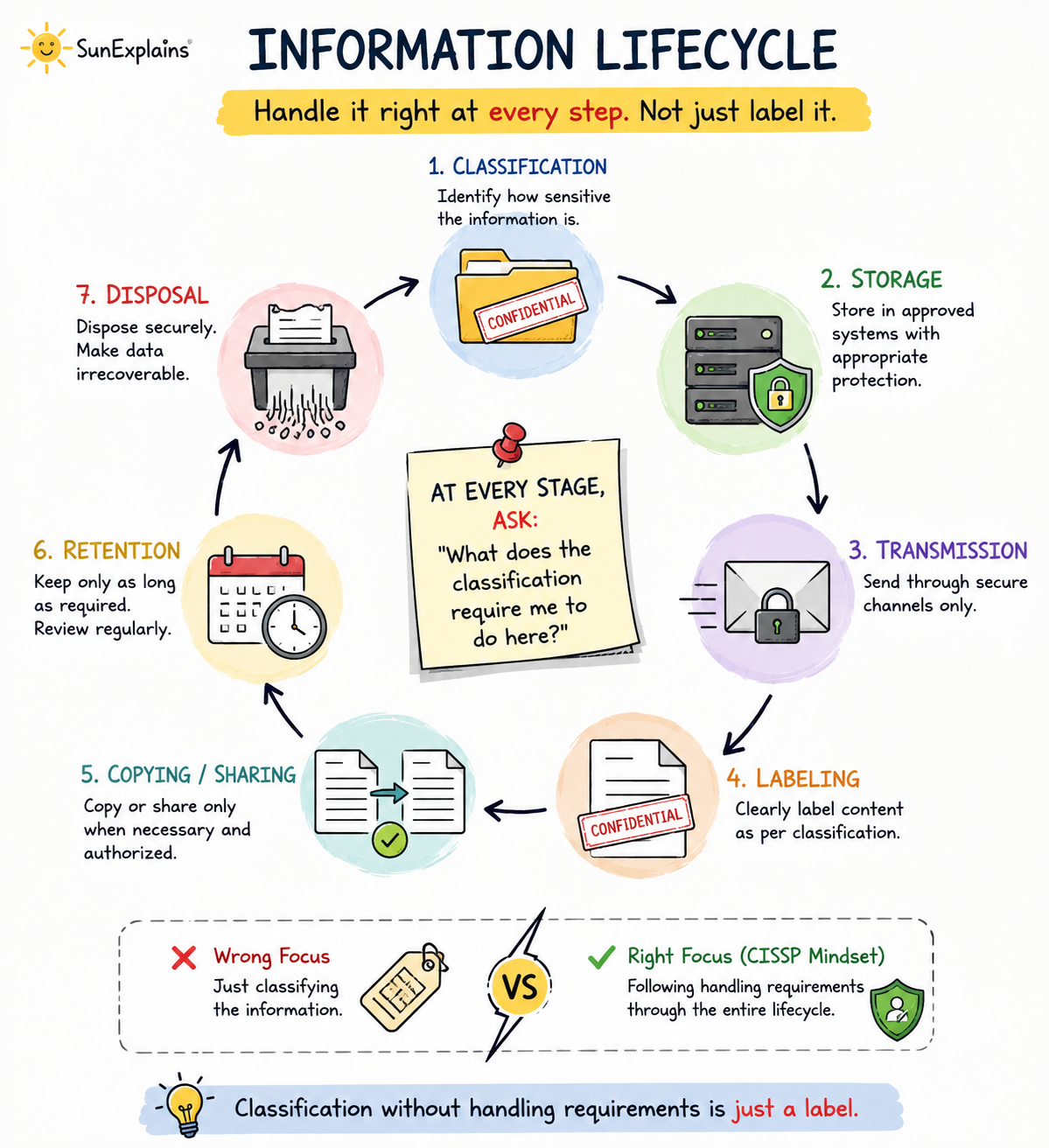
At every stage, ask:
“What does the classification require me to do here?”
Key Differences to Keep in Mind
| Concept | Difference | Example |
|---|---|---|
| Classification vs Handling | Classification labels data; handling dictates actions. | A file marked Confidential still needs encryption and controlled sharing. |
| Deletion vs Disposal | Deletion removes references; disposal prevents recovery. | Emptying the recycle bin is not the same as securely wiping a disk. |
| Encryption vs Lifecycle Protection | Encryption protects stored or transmitted data but does not replace disposal or access controls. | An encrypted drive still requires secure destruction when retired. |
Summary Table
| Concept | Definition | Everyday Example | Technical Example |
|---|---|---|---|
| Data Classification | Categorizing information by sensitivity | “Fragile” sticker on a package | Marking customer PII as Confidential |
| Information Handling Requirements | Rules for managing classified data | Medicine usage instructions | Encrypting, restricting, and auditing confidential files |
| Secure Disposal | Making data irrecoverable when no longer needed | Shredding paper documents | Sanitizing or physically destroying retired storage media |
| Information Lifecycle | Managing data from creation to destruction | Caring for a rented car until return | Storing, transmitting, retaining, and disposing of corporate records securely |
🌞 The Last Sun Rays…
The biggest misconception in Asset Security is believing that classification alone protects information.
It doesn’t.
Classification simply tells you how valuable the data is. The real protection comes from consistently applying the appropriate handling requirements during storage, transmission, copying, retention, and disposal.
Think of classification as the destination on a GPS. It tells you where you’re going, but it doesn’t drive the car.
For CISSP candidates, remember this simple framework:
Storage → Transmission → Labeling → Copying → Disposal
And at every step, ask:
“What does the classification require here?”
Because in the end, classification without handling requirements is just a label.
FAQ
1. What are information handling requirements?
They are policies and procedures that define how information should be stored, transmitted, copied, retained, and disposed of based on its classification.
2. Is data classification enough to protect sensitive information?
No. Classification identifies sensitivity, but security depends on enforcing the corresponding handling requirements.
3. Why isn’t deleting a file considered secure disposal?
Deleted files can often be recovered unless the storage media is properly sanitized or physically destroyed.
4. What lifecycle stages should organizations secure?
Creation, storage, transmission, sharing, retention, archival, and disposal.
5. What is an easy way to remember information handling for the CISSP exam?
Use the mnemonic: Storage → Transmission → Labeling → Copying → Disposal, and ask what controls the classification requires at each stage.
To understand how information classification connects to broader asset security, see Information and Asset Classification Explained: CISSP Domain 2 Asset Security Guide. For deeper context on data lifecycle protection including ownership and retention, see Data Security Explained: Classification, Ownership, Retention, and Protection. Asset ownership roles and governance responsibilities are covered in detail in Information Ownership and Asset Management in CISSP Domain 2.3.
For official resources, visit (ISC)² CISSP Certification.
Related reading: Explore more in-depth coverage across the CISSP Study Guide and other resources listed below.
- CISSP Study Guide — the complete roadmap for all 8 CISSP domains
- CISSP Elite Framework — exam-focused revision content
- Data Security — technical controls that enforce handling requirements

By profession, a CloudSecurity Consultant; by passion, a storyteller. Through SunExplains, I explain security in simple, relatable terms — connecting technology, trust, and everyday life.
Leave a Reply